Self-Testing Pages with JavaScript

Working at an agency I am involved more and more on projects in which client side code is developed internally then sent out to a separate team for implementation. You provide static HTML, CSS and JavaScript which then get placed into the CMS and brought to life as an actual website. As you can imagine this can sometimes lead to frustrations. However many safeguards you include, handing over your code to someone else is always a difficult thing to do effectively.
In this article I will show you how you can create a JavaScript implementation checker and that will give you more time for drink based activity as your web site and apps are launched quicker and with less unwanted drama!
An all too frequent occurrence
You’ve been working on a project for weeks, fixed all your bugs and send it to be implemented. You hear nothing and assume all is going well then a few days before it’s meant to launch you get an email from the implementation team informing you of bugs in your code that you need to urgently fix.
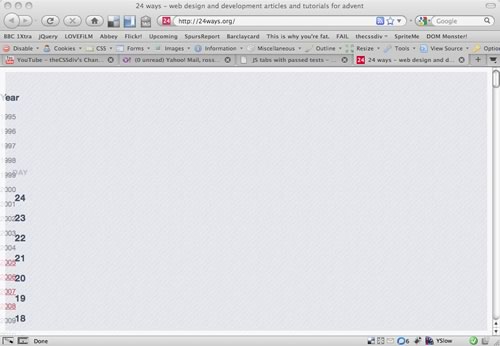 The 24ways website with a misspelt ID for the years menu
Being paranoid you trawl through the preview URL, check they have the latest files, check your code for errors then notice that a required HTML attribute has been omitted from the build and therefore CSS or JavaScript you’ve hooked onto that particular attribute isn’t being applied and that’s what is causing the “bug”.
It takes you seconds drafting an email informing them of this, it takes then seconds putting the required attribute in and low and behold the bug is fixed, everyone is happy but you’ve lost a good few hours of your life – this time could have been better spent in the pub.
I’m going to show you a way that these kind of errors can be alerted immediately during implementation of your code and ensure that when you are contacted you know that there actually is a bug to fix. You probably already know the things that could be omitted from a build and look like bugs so you’ll soon be creating tests to look for these and alert when they are not found on the rendered page. The error is reported directly to those who need to know about it and fix it. Less errant bug reports and less frantic emails ahoy!
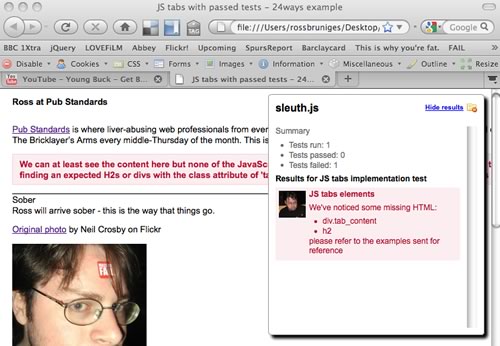 A page with an implementation issue and instant feedback on the problem
JavaScript selector engines to the rescue
Whether you’re using a library or indeed tapping into the loveliness of the new JavaScript Selector APIs looking for particular HTML elements in JavaScript is fairly trivial now.
For instance this is how you look for a div element with the id attribute of year (the missing attribute from top image) using jQuery (the library I’ll be coding my examples in):
if ($(‘div#year’).length) {
	alert(‘win’);
}
Using this logic you can probably imagine how you can write up a quick method to check for the existence of a particular element and alert when it’s not present — but assuming you have a complex page you’re going to be repeating yourself a fair bit and we don’t want to be doing that.
Test scripts
If you’ve got a lot of complex HTML patterns that need testing across a number of different pages it makes sense to keep your tests out of production code. Chances are you’ve already got a load of heavy JavaScript assets, and when it comes to file size saving every little helps.
I don’t think that tests should contain code inside of them so keep mine externally as JSON. This also means that you can use the one set of tests in multiple places. We already know that it’s a good idea to keep our CSS and JavaScript separate so lets continue along those lines here.
The test script for this example looks like this:
{
	"title": "JS tabs implementation test",
	"description": "Check that the correct HTML patterns has been used",
	"author": "Ross Bruniges",
	"created": "20th July 2009",
	"tests": [
		{
			"name": "JS tabs elements",
			"description": "Checking that correct HTML elements including class/IDs are used on the page for the JS to progressively enhance",
			"selector": "div.tabbed_content",
			"message": "We couldn't find VAR on the page - it's required for our JavaScript to function correctly",
			"check_for": {
				"contains": {
					"elements": [
						"div.tab_content", "h2"
					],
					"message": "We've noticed some missing HTML:</p><ul><li>VAR</li></ul><p>please refer to the examples sent for reference"
				}
			}
		}
	]
}
The first four lines are just a little bit of meta data so we remember what this test was all about when we look at it again in the future, or indeed if it ever breaks. The tests are the really cool parts and firstly you’ll notice that it’s an array – we’re only going to show one example test here but there is no reason why you can’t place in as many as you want. I’ll explain what each of the lines in the example test means:
name– short test name, I use this in pass/fail messaging laterdescription– meta data for future referenceselector– the root HTML element from which your HTML will be searchedmessage– what the app will alert if the initial selector isn’t foundcheck_for– a wrapper to hold inner tests – those run if the initial selector does matchcontains– the type of check, we’re checking that the selector contains specified elementselements– the HTML elements we are searching formessage– a message for when these don’t match (VARis substituted when it’s appended to the page with the name of any elements that don’t exist)
It’s very important to pass the function valid JSON (JSONLint is a great tool for this) otherwise you might get a console showing no tests have even been run.
The JavaScript that makes this helpful
Again, this code should never hit a production server so I’ve kept it external. This also means that the only thing that’s needed to be done by the implementation team when they are ready to build is that they delete this code.
<script src="sleuth.js" type="text/javascript"></script>
<script type="text/javascript">
	$(document).ready(function() {
	  sleuth.test_page.init(‘js_tabs_test.js');
	});
</script>
“View the full JavaScript:/examples/self-testing-pages-with-javascript/js/tests/test_suite.js
The init function appends the test console to the page and inserts the CSS file required to style it (you don’t need to use pictures of me when tests pass and fail though I see no reason why you shouldn’t), goes and grabs the JSON file referenced and parses it. The methods to pass (tests_pass) and fail (haz_fail) the test I hope are pretty self-explanatory as is the one which creates the test summary once everything has been run (create_summary).
The two interesting functions are init_tests and confirm_html.
init_tests
init_tests:function(i,obj) {
	var $master_elm = $(obj.selector);
	sleuth.test_page.$logger.append("<div id='test_" + i + "' class='message'><p><em>" + obj.name + "</em></p></div>");
	var $container = $('#test_' + i);
	if (!$master_elm.length) {
		var err_sum = obj.message.replace(/VAR/gi, obj.selector);
		sleuth.test_page.haz_failed(err_sum, $container);
		return;
	}
	if (obj.check_for) {
		$.each(obj.check_for,function(key, value){
			sleuth.test_page.assign_checks($master_elm, $container, key, value);
		});
	} else {
		sleuth.test_page.tests_passed($container);
		return;
	}
}
The function gets sent the number of the current iteration (used to create a unique id for its test summary) and the current object that contains the data we’re testing against as parameters.
We grab a reference to the root element and this is used (pretty much in the example shown right at the start of this article) and its length is checked. If the length is positive we know we can continue to the inner tests (if they exist) but if not we fail the test and don’t go any further. We append the error to the test console for everyone to see.
If we pass the initial check we send the reference to the root element, message contains and the inner object to a function that in this example sends us on to confirm_html (if we had a more complex test suite it would do a lot more).
confirm_html
confirm_html:function(target_selector, error_elm, obj) {
	var missing_elms = [];
	$.each(obj.elements, function(i, val) {
		if (!target_selector.find(val).length) {
			missing_elms.push(val);
		}
	});
	if (missing_elms.length) {
		var file_list = missing_elms.join('</li><li>');
		var err_sum = obj.message.replace(/VAR/gi, file_list);
		sleuth.test_page.haz_failed(err_sum, error_elm);
		return;
	}
	sleuth.test_page.tests_passed(error_elm);
	return;
}
We’re again using an array to check for a passed or failed test and checking its length but this time we push in a reference to each missing element we find.
If the test does fail we’re providing even more useful feedback by informing what elements have been missed out. All the implementation team need do is look for them in the files we’ve sent and include them as expected.
No more silly implementation bugs!
Here is an example of a successful implementation.
Here are some examples of failed implementations – one which fails at finding the root node and one that has the correct root node but none of the inner HTML tests pass.
Is this all we can check for?
Certainly not!
JavaScript provides pretty easy ways to check for attributes, included files (if the files being checked for are being referenced correctly and not 404ing) and even applied CSS.
Want to check that those ARIA attributes are being implemented correctly or that all images contain an alt attribute well this simple test suite can be extended to include tests for this – the sky is pretty much up to your imagination.
About the author
Ross Bruniges is a client-side engineer currently working at LBi, a large creative agency on Brick Lane in London. A long-serving Pub Standards regular, Ross likes beer, fine dining, taking pictures of fine dining, making videos, rap music and twittering the word beer (normally alongside other words too).
He has a blog in much need of a designers touch. Depending on how well his article on 24ways goes he plans to blog more in the future…
Brought to you by

Related articles
-
Bringing Your Code to the Streets
Ruth John breaks out of the browser and projects a Christmas sound and light show with some JavaScript, the Web MIDI API and a portable A/V pack. Don’t make a spectacle of yourself at the party this year – take it outside!
-
Five Interesting Ways to Use Array.reduce() (And One Boring Way)
Chris Ferdinandi turns the heat down low and lets the sauce reduce while we take a look at how to add spice to our source with a sprinkling of Array.reduce(). Just a little ingenuity with the humblest of functions.
-
Mistletoe Offline
Jeremy Keith reminds us that 4G is king. The carollers sing. One tunnel has passed, a new one’s beginning. Dreams of wi-fi on the go. Fingers numb, smart phones aglow. It’s Christmas time, mistletoe offline. Children streaming their gameplay online. With batteries on fire and gigabytes for free, it’s time to rejoice in connectivity.
-
Taking Device Orientation for a Spin
Drew McLellan wraps up our 2016 season with a look at the HTML5 Device Orientation API and how an annoying physical interaction can become an annoying virtual one. Like the silver sixpence in your figgy pudding, there’s treasure to be found in our browsers, so dig in.
-
Teach the CLI to Talk Back
Anna Debenham sets out to humanise our interactions with the command line to put more of the user into the user interface. Like an injured hedgehog in the winter snow, sometimes we can all benefit from interacting with a human.
-
The Art of Mathematics: A Mandala Maker Tutorial
Hagar Shilo breaks out the Christmas decorations with a tutorial to show how a little knowledge of JavaScript can lead to impressive results. Forget about the doilies and fake snow on the windows, all we need to create geometric patterns is a web browser and a sprinkling of mathematics.