When working with the XMLHttpRequest object it appears you can only go one of three ways:
- You can stay true to the colorful moniker du jour and stick strictly to the
responseXMLproperty - You can play with proprietary – yet widely supported – fire and inject the value of responseText property into the
innerHTMLof an element of your choosing - Or you can be eval() and parse JSON or arbitrary JavaScript delivered via
responseText
But did you know that there’s a fourth option giving you the best of the latter two worlds? Mint uses this unmentioned approach to grab fresh HTML and run arbitrary JavaScript simultaneously. Without relying on eval(). “But wait-”, you might say, “when would I need to do this?” Besides the example below this technique is handy for things like tab groups that need initialization onload but miss the main onload event handler by a mile thanks to asynchronous scripting.
Consider the problem
Originally Mint used option 2 to refresh or load new tabs into individual Pepper panes without requiring a full roundtrip to the server. This was all well and good until I introduced the new Client Mode which when enabled allows anyone to view a Mint installation without being logged in. If voyeurs are afoot as Client Mode is disabled, the next time they refresh a pane the entire login page is inserted into the current document. That’s not very helpful so I needed a way to redirect the current document to the login page.
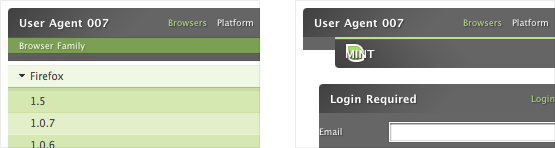
Enter the solution
Wouldn’t it be cool if browsers interpreted the contents of script tags crammed into innerHTML? Sure, but unfortunately, that just wasn’t meant to be. However like the body element, image elements have an onload event handler. When the image has fully loaded the handler runs the code applied to it. See where I’m going with this?
By tacking a tiny image (think single pixel, transparent spacer gif – shudder) onto the end of the HTML returned by our Ajax call, we can smuggle our arbitrary JavaScript into the existing document. The image is added to the DOM, and our stowaway can go to town.
<p>This is the results of our Ajax call.</p>
<img src="../images/loaded.gif" alt="" onload="alert('Now that I have your attention...');" />
Please be neat
So we’ve just jammed some meaningless cruft into our DOM. If our script does anything with images this addition could have some unexpected side effects. (Remember The Fly) So in order to save that poor, unsuspecting element whose innerHTML we just swapped out from sharing Jeff Goldblum’s terrible fate we should tidy up after ourselves. And by using the removeChild method we do just that.
<p>This is the results of our Ajax call.</p>
<img src="../images/loaded.gif" alt=""
onload="alert('Now that I have your attention...');this.parentNode.removeChild(this);" />


Comments
Comments are ordered by helpfulness, as indicated by you. Help us pick out the gems and discourage asshattery by voting on notable comments.
Got something to add? You can leave a comment below.
24/12/2005
Well, that was truly Inman-style.
Very cool trick, thanks a lot.
Vote Helpful or Unhelpful
24/12/2005
I guess eventually I’ll incorporate this into something I do but for now I’m really just looking for some traffic. I’ve just started so give us a chance people the content will improve.
Vote Helpful or Unhelpful
24/12/2005
another great article .. :) thanks for these.
During the last few weeks. I really enjoyed the ajax ones, great little intros to something I knew little about
Happy Christmas
Vote Helpful or Unhelpful
24/12/2005
I ditto James. It’s been lots of great articles in this series, and i’ve especially enjoyed the Ajax ones, since that’s what i knew least about.
Now, who’s up for 365ways.org? :)
Vote Helpful or Unhelpful
24/12/2005
This is really cool, however in IE the tab floats to high (i know it’s just a demo so I don’t care), but assuming that it is made for firefox primarily then I was disappointed that in my firefox the ajax result message loads into the entire tab rather than into the content area – ie it replaces the whole page as if you weren’t using ajax. Not sure why it does this, but my FF1.5 install isn’t that odd – but maybe it is an extension conflict although I usually have no problem with ajax calls.
As a note to people (not directly related to this article) – the img onload event isn’t called in some browsers if the image is loaded from the cache – I can’t remember which browsers tho. Something worth noting but easily overcoming by preventing caching (only for small images) – img.src=”myimage.gif?” + uniqueNum;
I’m sure that is all taken into consideration tho in this example.
Vote Helpful or Unhelpful
24/12/2005
Jon B: It’s just a proof-of-concept demo page. Sorry, I thought that was obvious.
Vote Helpful or Unhelpful
24/12/2005
Hi, I didn’t mean to sound superior or mean or anything – I know it’s just a demo, and a great one, I like the idea a lot and will remember it for future use. I had never thought of this and I think my prob with firefox is that the return false isn’t working for some reason – my fault no doubt.
Sorry if I gave the wrong impression, I hang my head in shame :(
Merry Christmas
Vote Helpful or Unhelpful
24/12/2005
This code has been tested (and is known to work) in IE PC 5, 5.5, 6.0, Firefox 1.0x, 1.5, Opera 8 and Safari 2.0. The onload event fires consistently in all browsers tested.
Vote Helpful or Unhelpful
24/12/2005
Not too long ago, I wrote a script converting a string to an array of DOM nodes. It allows the string to be slightly malformed, but not completely. I prefer it to changing the innerHTML.
Vote Helpful or Unhelpful
24/12/2005
is there anything shaun can’t do? hey shaun can you fix my sink?
Vote Helpful or Unhelpful
24/12/2005
Hey Shaun, I said it wasn’t particular a reference to this article, it was more to point out a possible gotcha when people implement something similar. We have built projects before that rely on the image onload event and have found that in some browsers (Opera and IE) the onload event fails to fire if the image is drawn from the cache rather than from the web. Do a google search and you’ll see I’m not making it up. I also said I was sure it was taken into consideration in this article – I’m really sorry if I got people’s backs up, but the onload ‘gotcha’ was a real pain when we first ran into it and I just thought it might be worth pointing out here.
Seriously I love this site and all the tips and have been really interested in everything. I learnt everything I know from guys like you all and I don’t assume I know more than any of you.
Vote Helpful or Unhelpful
24/12/2005
Merry Christmas Mr. Lawrence!
Merry Christmas!
Vote Helpful or Unhelpful
24/12/2005
Thanks to all authors involved in this series – it’s been great. Merry Christmas to all!
Vote Helpful or Unhelpful
25/12/2005
What a great finish to the advent series. Way to bring it home Shaun
Vote Helpful or Unhelpful
25/12/2005
It seems like there should be a better way to do this by running the script from the main page and not the ajax page.
Is it possible to check if the responseText is loaded, and if so, run the script?
Vote Helpful or Unhelpful
25/12/2005
“Is it possible to check if the responseText is loaded, and if so, run the script?”
Yes, but that requires that the JavaScript you are going to run be known and already loaded by the containing page before making the request.
The point here is that the JavaScript loaded from the XMLHttpRequest along with the HTML fragment is arbitrary.
Vote Helpful or Unhelpful
26/12/2005
It won’t work if the user has turned images off, will it?
Vote Helpful or Unhelpful
26/12/2005
Great advent series. Kudos to Drew, the guest authors and everyone who contributed feedback.
Vote Helpful or Unhelpful
26/12/2005
Could this be handy to use too?
and what about removing the inline onload handler of the image since that code wont validate when using a strict doctype?
Since we use DOM why not do this:
Create an object:
document.getElementById(‘LoadedImg’)
loadImg = function(){
// check if has loaded allready, and if so, abandon it.if( this.hasloaded ) { return; }
// if not, mark it as having already runthis.hasloaded = true;
alert(‘Now that I have your attention…’);
this.parentNode.removeChild(this);
}
document.getElementById(‘LoadedImg’).hasloaded = false;
document.getElementById(‘LoadedImg’).onload = loadImg;
if(document.getElementById(‘LoadedImg’).complete) {
document.getElementById(‘LoadedImg’).onload();
}
Vote Helpful or Unhelpful
26/12/2005
@ Jon B
” We have built projects before that rely on the image onload event and have found that in some browsers (Opera and IE) the onload event fails to fire if the image is drawn from the cache rather than from the web. ”
For a solution: see my previous post (all credit for this: goes to Tarquin Wilton Jones from http://www.howtocreate.co.uk/
Vote Helpful or Unhelpful
27/12/2005
@Four Feathers…off topic – but just by looking at some of the code you posted, I think you’d really dig the prototype $() dollar function ;)
Vote Helpful or Unhelpful
27/12/2005
I really love this technique! Going to use it a lot in my new project!
Vote Helpful or Unhelpful
28/12/2005
@ Four Feathers
Thanks, strangely enough I have never come across the img.complete property before, tried googling but not much detailed info seems to come up about it. Is it a standard property or something that is browser specific? I see I’m going to have to do some tests now – I hate tests lol.
However since firefox and safari both fire the img.onload and maybe the new opera builds do (haven’t tested) we only need a IE ‘fix’ – I call it a fix but technically IE has a point for doing what it does.
Vote Helpful or Unhelpful
28/12/2005
off-topic
@Jon B: works for IE and Opera to solve cache issues for img onload
Vote Helpful or Unhelpful
28/12/2005
@Four Feathers: I’m not sure your method addresses the same problem as the one outlined in the article. The technique in the article allows you to return HTML and arbitrary JavaScript from a single XMLHttpRequest.
It appears that your code would have to be embedded in the page that makes the request, not the one returned by it. In which case a callback function (that doesn’t require the use of an image) attached to the onreadystatechange() event handler of the request object is the better solution.
Vote Helpful or Unhelpful
29/12/2005
@ ShaunI
onreadystatechange() is a IE WIN event handler, no? My codesnippet fixes cache issues with Opera and IE WIN with the image onload event handler.
Can you give an example where you point out this callback function …?
Vote Helpful or Unhelpful
29/12/2005
Is this article related to the discussion: it feels like it …
http://www.quirksmode.org/blog/archives/2005/12/the_ajax_respon.html
Vote Helpful or Unhelpful
31/12/2005
It is possible to dynamically set the src property of a script object. And the browsers that don’t let you do that will let you completely replace the innerHTML of a span that contains a script object with a new script object that has a new value for the src attribute. While this approach has nothing to do with standards or ideal implementations, it does work in more environments than AJAX because you don’t need a browser that supports the XMLHttpRequest object. If you’d like to see this approach in action, you can check out http://daylo.com Everything on that site that seems to use AJAX actually uses the above mentioned technique.
Vote Helpful or Unhelpful
31/12/2005
Sean Inman is so annoying, he’s always inventing cool stuff!!!
Vote Helpful or Unhelpful
31/12/2005
Muito bom!
Vote Helpful or Unhelpful
02/01/2006
Has this website really ended???!!! NOOOOOOOOOOOOOOO
CONTINUE ON
Vote Helpful or Unhelpful
02/01/2006
If you’re going to use an image element, why not set the script as the value of an onerror attribute? It doesn’t require an additional HTTP request.
[img src="" onerror="script">Vote Helpful or Unhelpful
05/01/2006
this technique works.. I use it
Vote Helpful or Unhelpful
18/01/2006
This site was amazing! Any developments for another one next Xmas?
Vote Helpful or Unhelpful
Impress us