During the recent US elections, Twitter decided to add an ‘election bar’ as part of their site design. You could close it if it annoyed you, but the action wasn’t persistent and the bar would always come back like a bad penny.
The solution to common browsing problems like this is CSS. ‘User styling’ (or the creepy ‘skinning’) is the creation of CSS rules to customise and personalise a particular domain. Aside from hiding adverts and other annoyances, there are many reasons for taking the time and effort to do it:
- Improving personal readability by changing text size and colour
- Personalising the look of a web app like GMail to look less insipid
- Revealing microformats
- Sport! My dreams of site skinning tennis are not yet fully realised, but it’ll be all the rage by next Christmas, believe me.
Hopefully you’re now asking “But how? HOW?!”. The process of creating a site skin is roughly as follows:
- See something you want to change
- Find out what it’s called, and if any rules already apply to it
- Write CSS rule(s) to override and/or enhance it.
- Apply the rules
So let’s get stuck in…
See something
Let’s start small with Multimap.com. Look at that big header – it takes up an awful lot of screen space doesn’t it?
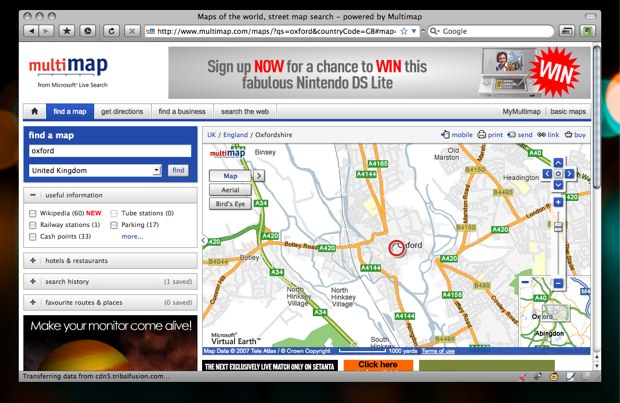
No matter, we can fix it.
Tools
Now we need to find out where that big assed header is in the DOM, and make overriding CSS rules. The best tool I’ve found yet is the Mac OS X app, CSS Edit. It utilises a slick ‘override stylesheets’ function and DOM Inspector. Rather than give you all the usual DOM inspection tools, CSS Edit’s is solely concerned with style. Go into ‘X-Ray’ mode, click an element, and look at the inspector window to see every style rule governing it. Click the selector to be taken to where it lives in the CSS. It really is a user styling dream app.
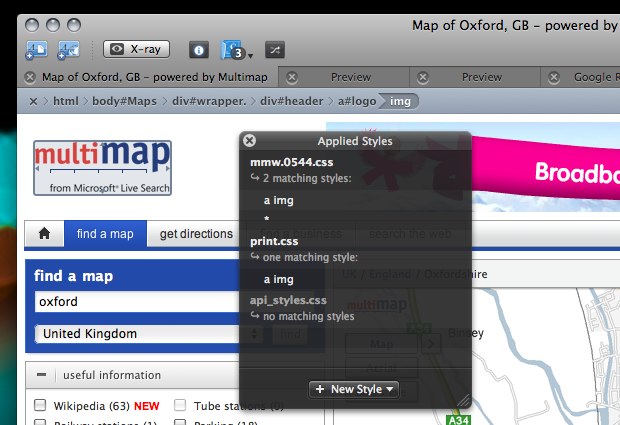
Having said all that, you can achieve all this with free, cross platform tools – namely Firefox with the Firebug and Stylish extensions. We’ll be using them for these examples, so make sure you have them installed if you want to follow along.
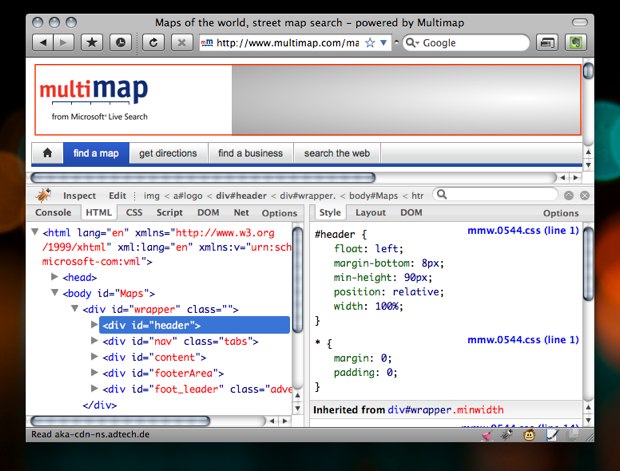
Using Firebug, we can see that the page is very helpfully marked up, and that whole top area is simply a div with an ID of header.
Change Something
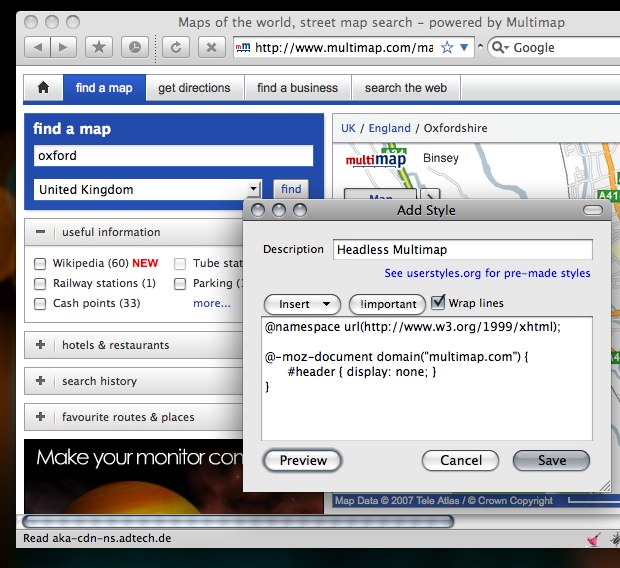
When you installed Stylish, it added a page and brush icon to your status bar. Click on that, and choose Write Style > for Multimap.com. The other options allow you to only create a style for a particular part of a website or URL, but we want this to apply to the whole of Multimap:
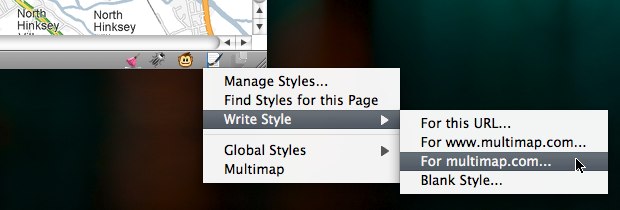
The ‘Add Style’ window then pops up, with the @-moz-document query at the top:
@namespace url(http://www.w3.org/1999/xhtml);@-moz-document domain("multimap.com") {}
All you need to do is add the CSS to hide the header, in between the curly brackets.
@namespace url(http://www.w3.org/1999/xhtml);@-moz-document domain("multimap.com") {#header {display: none;}}

A click of the preview button shows us that it’s worked! Now the map appears further up the page. The ethics of hiding adverts is a discussion for another time, but let’s face it, when did you last whoop at the sight of a banner?
Make Something Better
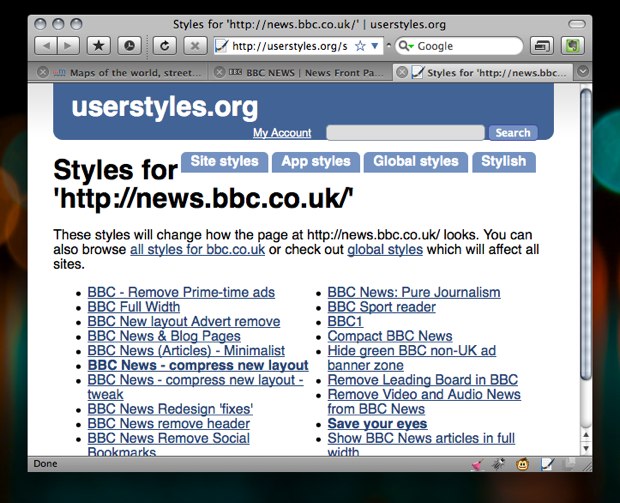
If we’re happy with our modifications, all we need to do is give it a name and save. Whenever you visit Multimap.com, the style will be available. Stylish also allows you to toggle a style on/off via the status bar menu. If you feel you want to share this style with the world, then userstyles.org is the place to do it. It’s a grand repository of customisations that Stylish connects with. Whenever you visit a site, you can see if anyone else has written a style for it, again, via the status bar menu “Find Styles for this Page”. Selecting this with “BBC News” shows that there are plenty of options, ranging from small layout tweaks to redesigns:
What’s more, whenever a style is updated, Stylish will notify you, and offer a one-click process to update it. This does only work in Firefox and Flock, so I’ll cover ways of applying site styles to other browsers later.
Specific Techniques
Important!
In the Multimap example there wasn’t a display specified on that element, but it isn’t always going to be that easy. You may have spent most of your CSS life being a good designer and not resorting to adding !important to give your rule priority. There’s no way to avoid this in user styling – if you’re overriding an existing rule it’s a necessity! Be prepared to be typing !important a lot.
Star Selector
The Universal Selector is a particularly useful way to start a style. For example, if we want to make Flickr use Helvetica before Arial (as they should’ve done!), we can cover all occurrences with just one rule:
* {font-family: "Helvetica Neue", Helvetica, sans-serif !important;}
You can also use it to select ‘everything within an element’, by placing it after the element name:
#content * {font-family: "Helvetica Neue", Helvetica, sans-serif !important;}
Swapping Images
If you’re changing something a little more complex, such as Google Reader, then at some point you’ll probably want to change an <img>. The technique for replacing an image involves:
- making your replacement image the background of the
<img>tag - adding padding top and left to the size of you image to push the ‘top’ image away
- making the height and width zero.

The old image is then pushed out of the way and hidden from view, allowing the replacement in the background to be revealed. Targeting the image may require using an attribute selector:
img[src="/reader/ui/3544433079-tree-view-folder-open.gif"] {padding: 16px 0 0 16px;width: 0 !important;height: 0 !important;background-image: url(data:image/png;base64,iVBORw0KGgoAAAANSUhEUgAAABAAAAAQCAYAAAAf8/9hAAAABHNCSVQICAgIfAhkiAAAAAlwSFlzAAALEgAACxIB0t1+/AAAABx0RVh0U29mdHdhcmUAQWRvYmUgRmlyZXdvcmtzIENTM5jWRgMAAAAVdEVYdENyZWF0aW9uIFRpbWUAMjkvNi8wOJJ/BVgAAAG3SURBVDiNpZIhb5RBEIaf2W+vpIagIITSBIHBgsGjEYQaFLYShcITDL+ABIPnh4BFN0GQNFA4Cnf3fbszL2L3jiuEVLDJbCazu8+8Mzsmif9ZBvDy7bvXlni0HRe8eXL/zuPzABng62J5kFKaAQSQgJAOgHMB9vDZq+d71689Hcyw9LfAZAYdioE10VSJo6OPL/KNvSuHD+7dhU0vHEsDUUWJChIlYJIjFx5BuMB2mJY/DnMoOJl/R147oBUR0QAm8LAGCOEh3IOULiAl8jSOy/nPetGsbGRKjktEiBCEHMlQj4loCuu4zCXCi4lUHTNDtGqEiACTqAFSIOgAUAKv4bkWVy2g6tAbJtGy0TNugM3HADmlurKH27dVZSecxjboXggiAsMItRh99wTILdewYRpXVJWtY85k7fPW8e1GpJFJacgesXs6VYYomz9G2yDhwPB7NEBBDAMK7WYJlisYVBCpfaJBeB+eocFyVyAgCaoMCTJSTOOCWSyILrAnaXpSexRsxGGAZ0AR+XT+5fjzyfwSpnUB/1w64xizVI/t6q3b+58+vJ96mWtLf9haxNoc8Mv7N3d+AT4XPcFIxghoAAAAAElFTkSuQmCC) no-repeat !important;}- Source: /code/user-styling/5.txt
Woah boy! What was all that gubbins in the background-image? It was a Data URI, and you can create these easily with Hixie’s online tool. It’s simply the image translated into text so that it can be embedded in the CSS, cutting down on the number of http requests. It’s also a necessity with Mozilla browsers, as they don’t allow user CSS to reference images stored locally. Converting images to URI’s avoids this, as well as making a style easily portable – no images folder to pass around.
Don’t forget all your other CSS techniques at your disposal: inserting your own content with :before and :after pseudo classes, make elements semi-transparent with opacity and round box corners without hacking . You can have fun, and for once, enjoy the freedom of not worrying about IE!
User styling without Stylish
Instead of using the Stylish extension, you can add rules to the userContent.css file, or use @import in that file to load a separate stylesheet. You can find this is in /Library/Application Support/Camino/chrome/ on OS X, or C/Program Files/Mozilla Firefox/Chrome on Windows. This is only way to apply user styles in Camino, but what about other browsers?
Opera & Omniweb:
Both allow you to specify a custom CSS file as part of the site’s preferences. Opera also allows custom javascript, using the same syntax as Greasemonkey scripts (more on that below)
Safari
There are a few options here: the PithHelmet and SafariStand haxies both allow custom stylesheets, or alternatively, a Greasemonkey style user script can employed via GreaseKit. The latter is my favoured solution on my Helvetireader theme, as it can allow for more prescriptive domain rules, just like the Mozilla @-moz-document method. User scripts are also the solution supported by the widest range of browsers.
What now?
Hopefully I’ve given you enough information for you to be able start making your own styles. If you want to go straight in and tackle the ‘Holy Grail’, then off with you to GMail – I get more requests to theme that than anything else!
If you’re a site author and want to encourage this sort of tom foolery, a good way is to provide a unique class or ID name with the body tag:
<body id="journal" class="hicksdesign-co-uk">
This makes it very easy to write rules that only apply to that particular site. If you wanted to use Safari without any of the haxies mentioned above, this method means you can include rules in a general CSS file (chosen via Preferences > Advanced > Stylesheet) without affecting other sites.
One final revelation on user styling – it’s not just for web sites. You can tweak the UI of Firefox itself with the userChrome.css. You’ll need to use the in-built DOM Inspector instead of Firebug to inspect the window chrome, instead of a page. Great if you want to make small tweaks (changing the size of tab text for example) without creating a full blown theme.


Comments
03/12/2008
You, sir, are the king of CSS-hackers. Learned a lot from this article! Great to see such an odd subject getting some attention!!
03/12/2008
http://24ways.org/code/user-styling/5.txt
That was definitely something I wasn’t expecting, can anyone elaborate on this?
03/12/2008
Great tips there Jon, thanks!
Now I’m off to do some hacking :)
03/12/2008
Great article Jon!
We often forget that as web developers and designers we are (well, some of us) also web users – so nice to read something addressing this crossover and highlighting how our skills in the former can enhance our experiences in the latter.
03/12/2008
Jon, it was after seeing your article on skinning Google Reader that it dawned on me. I grabbed Firefox+Firebug and wrote my own “helvetica neue”-ish Gmail theme. And then put it into Stylish. But that wasn’t enough! Because the thing is… I’ve picked up the habit of using Fluid to access my GMail, so it was only a copy/paste away before I was using Fluid with user-styles. It just worked!
I guess what I’m saying here is that after all this is done, you can use the styles you just created on your Fluid-created-site, as it supports userstyles out of the box.
Great tips. Loved the img replacement. “Move over, Beethoven!” :D Thank you, sir.
03/12/2008
Thx for your article!
For german readers: There was also a nice article in C´t magazine 20/08, that deals with the same subject. Additionally it consists a part about using Greasemonkey to totally ‘pimp up’ the whole interface with JavaScript. It’s a nice combination! We use it to rewrite the editor of our vBulletin Board and add some useful administration buttons.
03/12/2008
Awesome sauce. Will definitely be utilising this for those annoying banner ads and such. Cheers and can’t wait for tomorrow’s article!
03/12/2008
Hi Jon,
Your readers will want to know about the Web Developer Toolbar by Chris Pederick. WDT supports adding User Style Sheets, targeting CSS selectors, and much more. Hands down, the best tool for hacking, er… reverse engineering.
Web Developer Toolbar
http://chrispederick.com/work/web-developer/
Cheers!
Luke
03/12/2008
Great article. I never knew this was possible but I’m off to explore (and improve!) some sites now.
03/12/2008
This is great. I can now eliminate all those annoying ads from some of the site it read daily.
03/12/2008
Great article Mr. Hicks, I had no Idea this was even possible with other browsers, and I’ve been doing this with stylish for quite a while. I don’t think the subject would remain odd for very long.
03/12/2008
Yeah, some interesting tips in this article. I’ve just installed Stylish and will be giving it a whirl. I’d already done something similar for Twitter in Opera (I use Opera for some things/FF for others), but it was really annoying when they’d keep changing their markup. :/
03/12/2008
Wow, this is awesome! I tend to do these things on the fly with Firebug, but I’ll definitely have to try out Stylish for a more permanent solution.
03/12/2008
@tim : agreed.
This is nice article… Thanks Jon
03/12/2008
Awesome stuff! I, too, learned a lot from the article and will try to put some of the lessons into action already today.
I’m happy to have found this advent calendar. It’s quickly turning into my favorite one. Keep impressing! :)
03/12/2008
Another great article!
A tool I use for this is this Firefox Addon – CSS Viewer [https://addons.mozilla.org/en-US/firefox/addon/2104] – fantastic except for a bug inwhich it is hidden behind flash objects due to z-index (but since it is CSS itself, this can probably be fixed with user styling!).
03/12/2008
Nice one. I took the article as cause to do away with all the clutter that has forever annoyed me about www.bahn.de, the German Railways’ official website. Usually it’s filled with well-meant advice and tons of information for just about everything remotely related to (train) travel.
Screenshot: default styling of www.bahn.de
So I went and installed stylish, started to dig into their HTML structure and ended up with a clean homepage that caters to the only need I personally ever have when I go to their website: finding a connection from A to B.
Screenshot: user-styled version of www.bahn.de
Thanks Jon! A good way to start the day. :)
03/12/2008
Jon,
excellent article – I did use Stylish for the election banner on Twitter; just never really think of using it otherwise.
But now you’ve got me going again – thanks :-)
03/12/2008
Great great great! And: I love CSSEdit too..
03/12/2008
Cheers for the tips.
I’ve just installed stylish, so hiding the banners should be a lot easier now than digging around for userContent.css!
03/12/2008
How have I not come across Stylish before now?! What a gem. Thanks as always Jon.
I know what I’ll be doing this morning…
03/12/2008
Brilliant, I kept reading about hacking sites CSS but never had the time to put it all together.
This is a brilliant tutorial Jon.
03/12/2008
So, where’s the user style for making 24 Ways display correctly in Opera? ;-)
03/12/2008
Like a lot of people I realised how easy this was when I blocked out the annoying US election bar on Twitter.
This is a great article/tutorial, and can see this is going to be big in 2009!
03/12/2008
Thanks for the kind comments so far!
@Lee – I did elaborate on that in the article, or do you mean more information? There’s not much more to say!
03/12/2008
Great article Jon. I can see us fellow designers/developers experimenting more and having fun with this.
General observation. Where you mention about the background image in the CSS (Data URI), and I quote:
“It’s simply the image translated into text so that it can be embedded in the CSS, cutting down on the number of http requests.”
I appreciate that this will reduce the number of HTTP requests but surely with numerous background images on sites these days this method will greatly increase the size of the CSS file(s). As I say it’s an observation and maybe food for thought?!?!
Looking forward to tomorrows post.
03/12/2008
Wow, thanks for this i’m just getting to grips with greasemonkey now you tell us there is stylish as well. I could rewrite the entire web just for me!
03/12/2008
Great projection Jon, I can see the site style tennis being quite an amusing game / challenge!
I like the class naming idea on the <body> tag – consider it implemented!
03/12/2008
Great article! This touches on a bigger branding-issue that I’m having; if you are running a business online and having a lot of client interactions online the styling/branding of the apps you are using will hurt your business.
What you describe in the article is great for “personal use” but as a business owner I rely on, and pay for, services that I can’t customize visually to fit with the rest of my brand. So when my clients log in to, lets say Basecamp or Freshbooks, to work with me they never see my brand.
What I think is needed in the future is some kind of “OpenBrand”-standard that works the same way as OpenID works. OpenBrand would be a unique place/url/identifier that contained information on colors, typography, grids, logos and other styling related elements.
So whenever I sign-up for a web app I submit my OpenBrand, and the web app takes care of the rest for me – “branding” itself according to my preferences.
03/12/2008
I was hoping for a CSSEdit article, but it could not be. Really nice write-up on customising websites. Lovely how you sneaked in Helvetireader with the folder icons!
03/12/2008
Great article Jon!
Like @Alun, I find it’s mostly about having the time to put it into practice.
Now to try and get it working in SSB apps like Fluid.
03/12/2008
I’ve been using this quite a while for the ugliest, most useful site on the internet, called Useit.com :-)
03/12/2008
Related to user styles, I’ve been toying with an idea now for nearly a year. On any new site that supports user profiles or ‘membership’ I have been thinking about adding a utility to allow users to upload their own user style and tie it directly to their profile. In this manner, their style would be applied to the site in any browser, on any machine (no need to have their style installed locally or require any browser extension). Of course this opens up security holes, but as far as I can see, stripping URLs (force data: URIs only) and stripping IE CSS expressions, I don’t see any other drawbacks. Perhaps requiring that any user style pass the W3C CSS validator as well (though that will limit certain techniques such as browser-specific prefixes)?
Thoughts? Comments?
03/12/2008
I vaguely knew this type of thing was possible but I never really saw any practical use for it… until now…
Definitely something to have a play around when time permits, although I think it may get addictive when you come across dodgy sites.
Many thanks… dN
03/12/2008
Great resource! We’re assembling sources of information for our clients and I’ll be sure to add your site to that list.
Thanks,
Shawn
03/12/2008
Hi Jon,
Great article!
A good friend of mine is always telling me……
“You will be forever learning in this business”, how right he is, today I have learned a few things and made one interesting discovery!…STYLISH!!
how have i never heard of this great little add-on. I also particularly enjoyed the bit about reducing http requests by inserting images translated into text so that it can be embedded into css, very handy! I had never thought of that! and there are a number of ways that good use could be made of it.
Just in case its of interest to anyone, I am quite fond of the Aardvark extension which allows you to mouse over elements within a page and display their class or ID, a very usefull way to quickly find out such information without having to loose any browser space! I use it all the time, I’m sure many others do, but just incase you don’t here’s the URL:
Aardvark Extension
http://karmatics.com/aardvark/
Oh how I love the 24ways to xmas time of the year!
03/12/2008
Good tutorial, though I have to admit that I am a little divided on user styles.
Whilst I think it can be useful to allow users to modify styles if they (for example) have special needs, putting this in the hands of the mainstream user could be a recipe for disaster.
It is already time consuming enough to get a site rendering correctly in a range of browsers – by throwing this technique into the equation you introduce an unknown variable to the website developer, and if there is a problem as a result its the poor developer, and not the user, who will likely get blamed.
I’ve seen this happen a lot with the Firefox extension GTDInbox which adds functionality to GMail by injecting CSS/Javascript into the page – usually when Google makes a major update something breaks, either making the extension unusable or in some cases making the entire site unusable.
There is also the other argument that by using this to remove entire sections of websites, you are depriving the webmaster of ad revenue or even the chance to promote other products/services.
I like the proposal advocating an OpenBrand standard, though I don’t think this would necessarly resolve both the problems above.
03/12/2008
Great article.
@Andreas Carlsson: I like the OpenBrand idea. It might go well as a CSS sheet conforming to some particular standard, and it’d definitely be useful for things like fansites and media kits.
04/12/2008
Just on the Data URI part, do you mean that the Images are encoded as a literal and displayed with no further requests to the server? If so I’ve actually never heard (or imagined) such techniques being even available. Anyways, I’m just wondering how wide support for these are since I have a feeling that we won’t get that lucky with them.
04/12/2008
great stuff… I’ve been using this technique for a couple of years already – my current setup gets rid of all the irritating advertising on Windows Live Mail, Facebook and Last FM… very handy
04/12/2008
@Chris Korhonen I agree with you that our OpenBrand idea does not solve the two problems that you are describing. But the first problem you describe is based on a non agreed change of style and non agreed add of functionality. And that will lead to both brilliant customization as well as disasters depending on the skills of the user that is making the changes. And that problem can never be solved in an easy way.
The other problem you talk about; removing parts of sites thus fiddling with ad-revenue and promotion. Yes that is bad but it is equally hard to solve as your first problem.
Our idea with the OpenBrand standard is not trying to solve those two problems.
What me and Jaan Orvet is asking for is a standard for agreed changes of styling, and we think that the OpenBrand idea is best suited for webapps and services, not public sites.
If you as a site owner or app-provider say “Ok, I follow the OpenBrand standard” then you know what parts of your app/service that will be open for user styling. And on the other side the user will know what they can change. It all has to be done in a controled way so that everyone knows the guidelines and it does not interfear with the overall development.
The main goal of OpenBrand is not to remove parts of the site or change functionality. It’s more to, as @Jason Karns is talking about, changing the look and feel of the app/service that I buy into so that it fits in with my (as a user) brand.
04/12/2008
@Michael Chui I’m glad that you like the idea!
Exactly, conforming the css, or at least parts of the css. The ideal situation would be a single source where the user stores his/hers styling info and then the site owner or app-provider can include that info into the users css.
In that way you as a developer doesn’t get users it “interfere” with your development by uploading css-files.
And you as a user doesn’t have to do the styling over and over for every app/service that you sign up for, that is done automatically when you sign up to a app/service that is supporting the OpenBrand standard.
04/12/2008
I love hacking sites with UserCSS. You can even turn ugly, table-based and center/font-tags-filled atrocities into pure minimalistic beauties. <a href=“userstyles.org/styles/2561”>Like this</a>.
05/12/2008
Such simple ideas to make your web browsing experience much smoother and less cluttered.
09/12/2008
awesome article..thanks!!
21/12/2008
Nice article. Glad that you drew my attention to Stylish, always seemed like too big of a pain to bother with before.
29/12/2008
Re: Data URI
It immediately got me thinking if creating an encoding script to run before deployment. So that I can work with normal non mind altering CSS and background images and then turn it into optimized CSS with data: URI right before it is deployed to the web server. As always when I get ideas like this the next though that hits me is “someone else should’ve thought about this before” and in this case it was true:
Check out http://duris.ru/faq/ for info about the technique and a great tool to do exactly what I wanted.
31/12/2008
Wow….how did i not know this existed? thanks for the great article!
09/02/2009
You may also want to check out the Console² addon for Firefox. It will show errors in CSS, chrome, Javascript, and a few others all in the same window. That way you don’t have to switch between FIrebug and the DOM inspector if you’re editing both styles.
04/04/2009
Nice post. I’m jealous of people who are so good at design. I struggle for hours making just average layouts!
Impress us