So apparently Christmas is coming. And what is Christmas all about? Well, cleaning out your address book, of course! What better time to go through your contacts, making sure everyone’s details are up date and that you’ve deleted all those nasty clients who never paid on time?
It’s also a good time to make sure your current clients and colleagues have your most up-to-date details, so instead of filling up their inboxes with e-cards, why not send them something useful? Something like a… vCard! (See what I did there?)
Just in case you’ve been working in a magical toy factory in the upper reaches of Scandinavia for the last few years, I’m going to tell you that now would also be the perfect time to get into microformats. Using the hCard format, we’ll build a very simple web page and markup our contact details in such a way that they’ll be understood by microformats plugins, like Operator or Tails for Firefox, or the cross-browser Microformats Bookmarklet.
Oh, and because Christmas is all about dressing up and being silly, we’ll make the whole thing look nice and have a bit of fun with some CSS3 progressive enhancement.
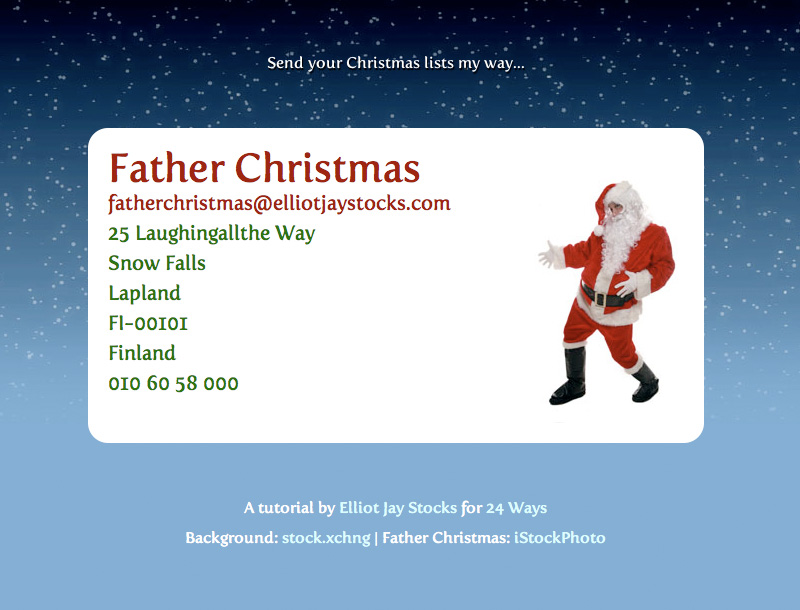
If you can’t wait to see what we end up with, you can preview it here.
Step 1: Contact Details
First, let’s decide what details we want to put on the page. I’d put my full name, my email address, my phone number, and my postal address, but I’d rather not get surprise visits from strangers when I’m fannying about with my baubles, so I’m going to use Father Christmas instead (that’s Santa to you Yanks).
Father Christmas
fatherchristmas@elliotjaystocks.com
25 Laughingallthe Way
Snow Falls
Lapland
Finland
010 60 58 000
Step 2: hCard Creator
Now I’m not sure about you, but I rather like getting the magical robot pixies to do the work for me, so head on over to the hCard Creator and put those pixies to work! Pop in your details and they’ll give you some nice microformatted HTML in turn.
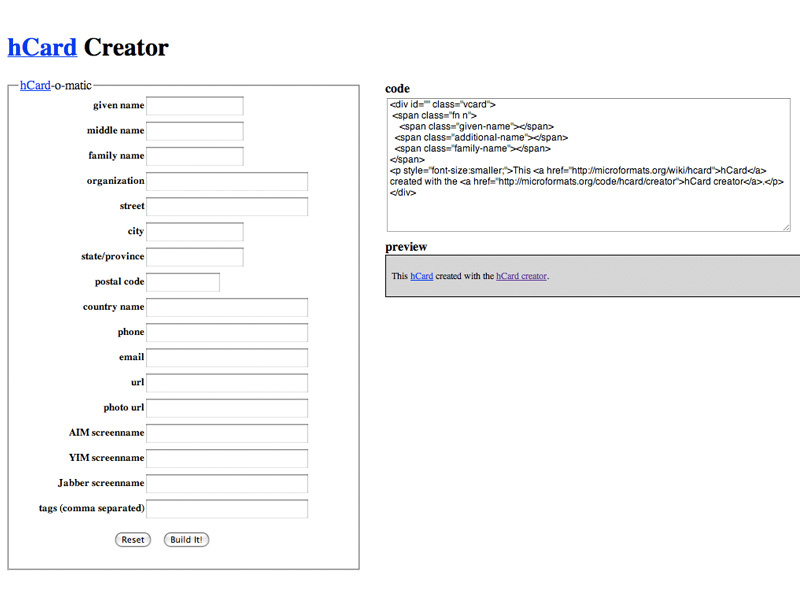
<div id="hcard-Father-Christmas" class="vcard">
<a class="url fn" href="http://elliotjaystocks.com/fatherchristmas">Father Christmas</a>
<a class="email" href="mailto:fatherchristmas@elliotjaystocks.com"> fatherchristmas@elliotjaystocks.com</a>
<div class="adr">
<div class="street-address">25 Laughingallthe Way</div>
<span class="locality">Snow Falls</span>
,
<span class="region">Lapland</span>
,
<span class="postal-code">FI-00101</span>
<span class="country-name">Finland</span>
</div>
<div class="tel">010 60 58 000</div>
<p style="font-size:smaller;">This <a href="http://microformats.org/wiki/hcard">hCard</a> created with the <a href="http://microformats.org/code/hcard/creator">hCard creator</a>.</p>
</div>
Step 3: Editing The Code
One of the great things about microformats is that you can use pretty much whichever HTML tags you want, so just because the hCard Creator Fairies say something should be wrapped in a <span> doesn’t mean you can’t change it to a <blink>. Actually, no, don’t do that. That’s not even excusable at Christmas.
I personally have a penchant for marking up each line of an address inside a <li> tag, where the parent url retains the class of adr. As long as you keep the class names the same, you’ll be fine.
<div id="hcard-Father-Christmas" class="vcard">
<h1><a class="url fn" href="http://elliotjaystocks.com/fatherchristmas">Father Christmas </a></h1>
<a class="email" href="mailto:fatherchristmas@elliotjaystocks.com?subject=Here, have some Christmas cheer!">fatherchristmas@elliotjaystocks.com</a>
<ul class="adr">
<li class="street-address">25 Laughingallthe Way</li>
<li class="locality">Snow Falls</li>
<li class="region">Lapland</li>
<li class="postal-code">FI-00101</li>
<li class="country-name">Finland</li>
</ul>
<span class="tel">010 60 58 000</span>
</div>
Step 4: Testing The Microformats
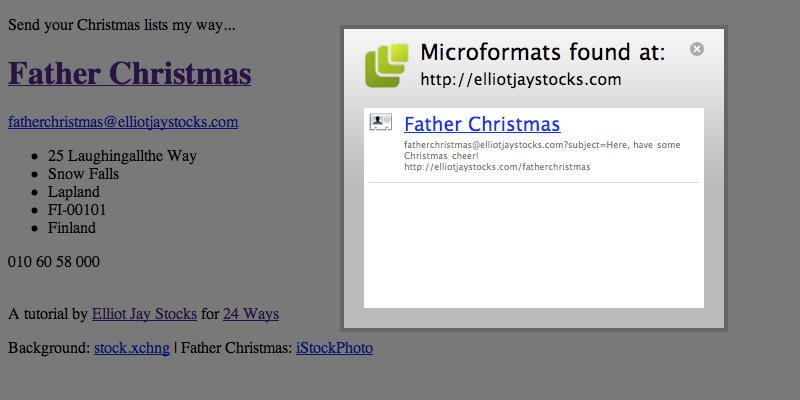
With our microformats in place, now would be a good time to test that they’re working before we start making things look pretty. If you’re on Firefox, you can install the Operator or Tails extensions, but if you’re on another browser, just add the Microformats Bookmarklet. Regardless of your choice, the results is the same: if you’ve code microformatted content on a web page, one of these bad boys should pick it up for you and allow you to export the contact info. Give it a try and you should see father Christmas appearing in your address book of choice. Now you’ll never forget where to send those Christmas lists!
Step 5: Some Extra Markup
One of the first things we’re going to do is put a photo of Father Christmas on the hCard. We’ll be using CSS to apply a background image to a div, so we’ll be needing an extra div with a class name of “photo”. In turn, we’ll wrap the text-based elements of our hCard inside a div cunningly called “text”. Unfortunately, because of the float technique we’ll be using, we’ll have to use one of those nasty float-clearing techniques. I shall call this “christmas-cheer”, since that is what its presence will inevitably bring, of course.
Oh, and let’s add a bit of text to give the page context, too:
<p>Send your Christmas lists my way...</p>
<div id="hcard-Father-Christmas" class="vcard">
<div class="text">
<h1><a class="url fn" href="http://elliotjaystocks.com/fatherchristmas">Father Christmas </a></h1>
<a class="email" href="mailto:fatherchristmas@elliotjaystocks.com?subject=Here, have some Christmas cheer!">fatherchristmas@elliotjaystocks.com</a>
<ul class="adr">
<li class="street-address">25 Laughingallthe Way</li>
<li class="locality">Snow Falls</li>
<li class="region">Lapland</li>
<li class="postal-code">FI-00101</li>
<li class="country-name">Finland</li>
</ul>
<span class="tel">010 60 58 000</span>
</div>
<div class="photo"></div>
<br class="christmas-cheer" />
</div>
<div class="credits">
<p>A tutorial by <a href="http://elliotjaystocks.com">Elliot Jay Stocks</a> for <a href="http://24ways.org/">24 Ways</a></p>
<p>Background: <a href="http://sxc.hu/photo/1108741">stock.xchng</a> | Father Christmas: <a href="http://istockphoto.com/file_closeup/people/4575943-active-santa.php?id=4575943">iStockPhoto</a></p>
</div>
Step 6: Some Christmas Sparkle
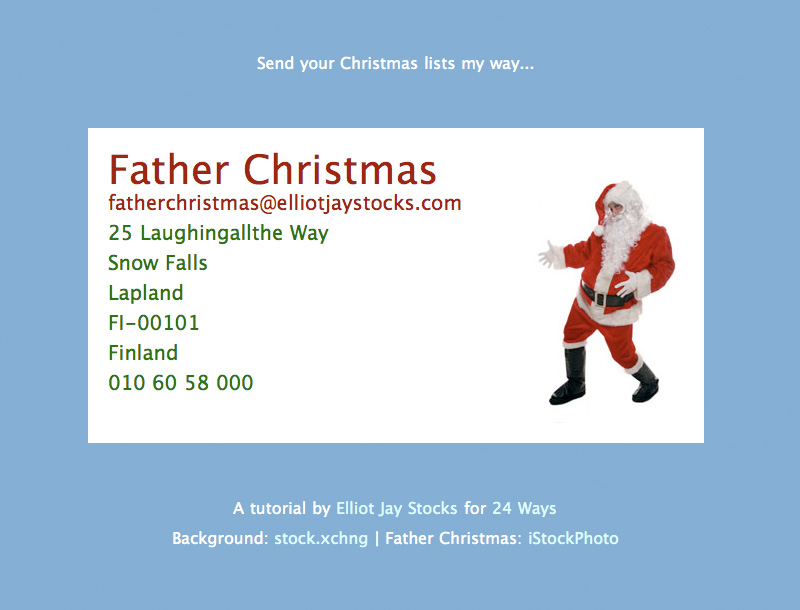
So far, our hCard-housing web page is slightly less than inspiring, isn’t it? It’s time to add a bit of CSS. There’s nothing particularly radical going on here; just a simple layout, some basic typographic treatment, and the placement of the Father Christmas photo. I’d usually use a more thorough CSS reset like the one found in the YUI or Eric Meyer’s, but for this basic page, the simple * solution will do.
Check out the step 6 demo to see our basic styles in place.
From this…

… to this:
Step 7: Fun With imagery
Now it’s time to introduce a repeating background image to the <body> element. This will seamlessly repeat for as wide as the browser window becomes.
But that’s fairly straightforward. How about having some fun with the Father Christmas image? If you look at the image file itself, you’ll see that it’s twice as wide as the area we can see and contains a ‘hidden’ photo of our rather camp St. Nick.

As a light-hearted visual… er… ‘treat’ for users who move their mouse over the image, we move the position of the background image on the “photo” div. Check out the step 7 demo to see it working.
Step 8: Progressive Enhancement
Finally, this fun little project is a great opportunity for us to mess around with some advanced CSS features (some from the CSS3 spec) that we rarely get to use on client projects. (Don’t forget: no Christmas pressies for clients who want you to support IE6!)
Here are the rules we’re using to give some browsers a superior viewing experience:
@font-faceallows us to use Jos Buivenga’s free font ‘Fertigo Pro’ on all text;text-shadowadds a little emphasis on the opening paragraph;body > p:first-childcauses only the first paragraph to receive this treatment;border-radiuscreated rounded corners on our maindivand the links within it;- and
webkit-transitionallows us to gently fade in between the default and hover states of those links.
And with that, we’re done! You can see the results here. It’s time to customise the page to your liking, upload it to your site, and send out the URL. And do it quickly, because I’m sure you’ve got some last-minute Christmas shopping to finish off!


Comments
Comments are ordered by helpfulness, as indicated by you. Help us pick out the gems and discourage asshattery by voting on notable comments.
Got something to add? You can leave a comment below.
10/12/2008
Fabulous I’ve been meaning to do some research on this micro formats thing. Embarrassingly I’ve only recently discovered it by its name. Great introduction for me thanks a lot.
This is definitely going to be part of my new portfolio. Nice with the css3 addition there as well.
Vote Helpful or Unhelpful
10/12/2008
Great article, Elliot :-)
I’ve been meaning to finally look into Mircoformats for ages – for far too long…. now you’ve got me started.
Thanks :)
Vote Helpful or Unhelpful
10/12/2008
A good tutorial and introduction for those that haven’t gotten into microformats (or CSS 3) yet.
Having said that, I’d have to disagree with your markup for the address. An unordered list is completely unsemantic for an address and the html that was generated automatically is far better. At least it’s not using the <address> element as lots of people tend to (that’s for the authors address, not general addresses in case anyone asks the question)
Good article though – I’m definitely going to be playing with some progressive enhancement this Christmas :-D
Vote Helpful or Unhelpful
10/12/2008
When using the Operator extension and choosing to export the contact and open with Windows Contacts (on Vista), none of the address fields are filled out. In your example, I get values for name, email address and URL, but none of the street address, locality, region etc.
I’ve had a similar problem when doing my own Microformats examples in the past – everything works OK except for whatever is contained in the element with the adr class. Presumably this is a problem with Windows Contacts rather than Microformats?
Vote Helpful or Unhelpful
10/12/2008
Nice work with the progressive enhancement, you could of used
moz-transition… for the FF3.1beta users out there.Box-shadow could of been used to lift the card off the background (except it is not progressive enhancement for Chrome users when combined with border radius)
The Firefox 3.1beta, nightly Webkits and Opera 10 alpha are beginning to show what can be done with CSS3 but it needs to be progressive enhancement.
Vote Helpful or Unhelpful
10/12/2008
That hCard Creator is back! What a cute tutorial you wrote :D
I concur with Ben. I don’t see why an address should be marked up with an unordered list when addresses don’t have any connection with lists.
Vote Helpful or Unhelpful
10/12/2008
Very nice, too bad the full impression can still only be seen in Safari.
Vote Helpful or Unhelpful
10/12/2008
How I wish I had read something as easy as this when I first tried to implement a vCard within my own site, the hCard creator would have stopped me messing about trying to get the thing to work. However after reading John Faulds comment, perhaps it wasn’t my fault?
Onto progressive enhancement, as we know you can round corners of elements by using -moz-border-radius and -webkit-border-radius and when I was implementing this into a site yesterday I started to wonder if I could implement this with a border and found that it only worked to a certain degree.
Although the outside corners were rounded, the insides were still pointed and hard on the eye. This might sound really stupid but is there something along the lines of -moz-border-inner-radius or something which would help me overcome this problem? I don’t think it’s possible in the first place, so I’m not holding my breath.
Great article Elliot, insightful as always.
Vote Helpful or Unhelpful
10/12/2008
Well, that’s sort of the point, Kaske. The idea is that we’re starting with basic markup describing the content. We then layer on some simple CSS for browsers that support it. On top of that we layer some more advanced CSS for browsers that support that. As browsers get better and implement more of the available specifications, then users of those browsers will see the finer points of the presentation. If not, what they get is just fine too. That's what progressive enhancement is about.
As for the use of a list for an address – I can see the argument for that. An address is a list of places ordered from specific to global. I’d argue that the order is important for the address to make sense, so perhaps an OL would be better than a UL. However, we could debate these tiny points all day, but that’s not really what this article is about.
Vote Helpful or Unhelpful
10/12/2008
@ Ben & Botclock: What Drew said.
@ Kaske: Again… what Drew said.
@ Jack I’ve found this problem too. I might be wrong but I think it’s due to the not-quite-perfect implementation, but if anyone knows of a fix, please feel free to jump in!
@ Drew: Cheers for sticking up for the progressive enhancement and list-based markup! You said it better than I ever could have. And, in hindsight, I think you’re right about how it should’ve been a <ol> rather than a <ul>. Good call.
Vote Helpful or Unhelpful
10/12/2008
Great article Elliot and nice to see designers embracing microformats.
I can see the argument for using a list but in which case howsabout a definition list? This will maintain a semantic (human readable) association when microformats are unavailable through name-value associations and the definition terms can be hidden/styled appropriately with CSS if required.
For example:
<dl>
<dt>Street address</dt>
<dd class=“street-address”>25 Laughingallthe Way</dd>
…
</dl>
Just a thought…
Vote Helpful or Unhelpful
10/12/2008
Cole – this article on definition lists by Mark Norman Francis is good reading.
Vote Helpful or Unhelpful
10/12/2008
To be honest, this sort of semantic nitpicking is one of my least favourite things about being part of the web design community. Semantics are a practical tool and make your documents meaningful and portable. What they are not is a weapon to beat other designers round the head with.
As Drew already pointed out, a list is a perfectly valid match for an address. A group of items, in a specific order, which are grouped for a specifc purpose? That sounds like a list to me!
As for the <address> thing – I’ve always been in two minds about this. On one hand, I know exactly what the spec says the address element means (how could anyone not? It gets mentioned at least once in any discussion of hCards – in this case, even without being in the example). On the other hand, I personally feel that if you’re going to defend semantics so thoroughly, it’s probably the most meaningful element (from a pure semantics point of view, that is). I’ve always gone with the specs on this, but I’ve always thought it represents a decision between sticking religiously to (X)HTML specs, and marking up your document as semantically as possible. Just an idle thought.
First comment on here, by the way, so I’ll just say well done on the redesign. It’s a bit special!
Take care,
Andi
Vote Helpful or Unhelpful
10/12/2008
Thanks @drew
Had read Mark’s article already but not entirely in agreement. I accept that in the rigours of the HTML spec the use of DL in the above example would probably be inappropriate but faced with the limitations of markup we are all having to examine the ways in which we can use the currently available HTML elements to add meaning to our content. That, of course, is the whole point of microformats – to add value where the current HTML specifications do not allow and to make that content accessible to machines.
Yes, the definition list is open to abuse (dailogue provides an excellent example) but personally I would be happy to use it for this situation where we are establishing unique name/value (term/description) pairings within that particular list, essentially defining that persons address/contact details.
Vote Helpful or Unhelpful
10/12/2008
@Cole – I would have thought that the problem with using a definition list is less about it being inappropriate and more about it being overkill. Addresses are already human-readable – we recognise them for what they are without labels on each line. The value of labelling is only to make an address machine-readable, and a definition list won’t help with that.
Vote Helpful or Unhelpful
10/12/2008
I’ve just worked out what’s wrong with this example (and all the hCards I’ve been doing up until now): for an address to show up in your exported contact, you need to specify whether it’s either a work or home address with (for example)
<span class=“type”>Work</span>
just as you have to do the same to distinguish between fax and phone numbers etc.
Vote Helpful or Unhelpful
10/12/2008
That sounds like a limitation of the tool you’re using then, John. The spec doesn’t require a type to be set. In fact, adr, tel and email all have default types which should be implied if no type is specified (if I’m reading it correctly).
Vote Helpful or Unhelpful
10/12/2008
Microformats just seem so obtrusive to me. Although a class isn’t a behavior, the same principles apply, and the code just gets so messy.
If, like in this example, you know the number of entries and their order, why not traverse the DOM (I’d use jQuery :eq(index)) and add the span classes with JavaScript. That way you keep your HTML clean. Microformats are an enhancement, so requiring JavaScript makes sense to me.
p.s. I feel an ordered list is the most semantic markup to use for the address.
Vote Helpful or Unhelpful
10/12/2008
Exports fine to MacOS Adress Book App. Using Firefox and Operator add-on
Vote Helpful or Unhelpful
10/12/2008
Mat, microformats are designed to add additional semantics to HTML to help a document author communicate the meaning of the content when HTML’s own semantics are not expressive enough.
Therefore it makes not sense to add them with JavaScript – it’s totally the wrong layer. Whilst it’s true that some of these little utility parsers run in a browser and therefore have JavaScript available (in which case why touch the document at all, right?), most parsers won’t have JavaScript and a DOM to work with.
Google and Yahoo both have some pretty neat microformats-based search tools in development that you can play with and get an idea of how useful structured data really is.
Vote Helpful or Unhelpful
10/12/2008
“That sounds like a limitation of the tool you’re using then, John. The spec doesn’t require a type to be set. In fact, adr, tel and email all have default types which should be implied if no type is specified (if I’m reading it correctly).”
The tool I’m using is the Operator extension for Firefox. It gives you the options of exporting contacts to Windows Contacts or Yahoo Contacts or opening a map in Google, Yahoo or MapQuest. Exporting to either of the two contacts options leaves the address fields blank; exporting to any of the maps apps returns the address.
So which is incorrect – the markup or Windows/Yahoo’s implementation?
I took the cue for adding a type class to the address yesterday after downloading Oomph – http://visitmix.com/Lab/Oomph – which is used to reveal Microformats info on pages. They use the type class and the address detalis show up when exporting a contact.
Whether it’s part of the spec or not, I think it’s worth mentioning that this seems to be what’s required to enable this functionality.
Vote Helpful or Unhelpful
10/12/2008
In the case of hCard, how would I mark up the different lines of a “street-address”?
I don’t agree that the lines in an address comprise a list, any more than that a series of paragraphs comprise a list.
I’m much more of a sceptic these days about the usefulness of microformats (yup, I came as the Grouch), but I’d love to be converted back to a more optimistic side. Helping search engines index your pages sounds like one of the better uses I can think of. You know what would be another use? Microformats in HTML email (something this example would suit!). A little widget in, say, Gmail, that can grab vCards and write an hCard right into the email. Gmail could parse out any microformats in received emails, too, and present the information in whichever way was appropriate. Of course, things would be better if we could just expect our email client to recognise addresses like Apple Mail! But until then, there’s always microformats.
Vote Helpful or Unhelpful
11/12/2008
@ John Faulds: While Drew is much better qualified to give you an in-depth answer about this than me, I will just say that I use Operator for Firefox as well, and the contact exports just fine for me… and automatically adds it to OSX’s Address Book app without a problem. I can only guess that it’s therefore a problem with Windows Contacts, Yahoo Contacts, or perhaps Operator / Firefox on Windows.
Vote Helpful or Unhelpful
11/12/2008
Great article Elliot.
Microformats are on my list as one of many improvements I want to implement into my site builds however, you may be able to answer a question that I’ve been asking myself since I started research into Microformats.
And that is whilst reading a presentation on Microformats one slide stated, and I quote:
Avoid “class-itisâ€
Now, surely thats how Microformats are set/work by adding descriptive classes to you semantic markup.
Maybe I’m missing the trick here but thats how I read and understood the explanation of how Microformats work.
Anyone else thought this too?
Vote Helpful or Unhelpful
11/12/2008
Classitis usually refers to the habit of needlessly sticking a class on anything and everything, (e.g. a class of “normal” on every paragraph) rather than using appropriate selectors to target parts of the document by context.
Microformats do use a lot of class names, but for a specific purpose, and to add value. No one wants to bloat their pages, but it’s not bloat if it’s adding something useful, no more than a large image in a page is bloat if it’s useful content.
Vote Helpful or Unhelpful
12/12/2008
Correction to my previous comment I suggested transitions for FF3.1beta. that is one CSS3 property not supported by FF3.1b. (I will claim getting confused between transformation and transition – lots of new CSS3 to learn).
Chrome has improved CSS3 support, and now supports transition, unfortunately border-radius + box-shadow bug still exists.
Classitis to me is sticking class name on everything to style them, and not understanding the best way to use CSS selectors to get the desired results. Why use p.normal when #content p gets the same results.
As Drew said class names for Microformats is for a specific purpose and add values.
And I am enjoying the conversation on semantic mark up of addresses. Most humans understand visually styled data, but not everybody and not computers.
Vote Helpful or Unhelpful
Impress us