Knockout Type - Thin Is Always In

OS X has gorgeous native anti-aliasing (although I will admit to missing 10px aliased Geneva — *sigh*). This is especially true for dark text on a light background. However, things can go awry when you start using light text on a dark background. Strokes thicken. Counters constrict. Letterforms fill out like seasonal snackers.
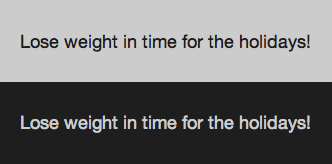

So how do we combat the fat? In Safari and other Webkit-based browsers we can use the CSS ‘text-shadow’ property. While trying to add a touch more contrast to the navigation on haveamint.com I noticed an interesting side-effect on the weight of the type.
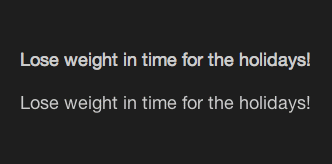
The second line in the example image above has the following style applied to it:
This creates an invisible drop-shadow. (Why is it invisible? The shadow is positioned directly behind the type (the first two zeros) and has no spread (the third zero). So the color, black, is completely eclipsed by the type it is supposed to be shadowing.)
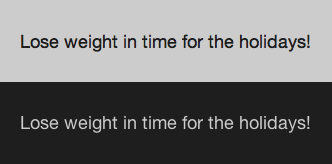

Why applying an invisible drop-shadow effectively lightens the weight of the type is unclear. What is clear is that our light-on-dark text is now of a comparable weight to its dark-on-light counterpart.

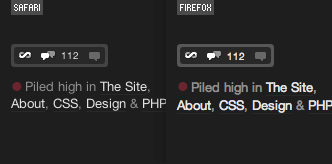
You can see this trick in effect all over ShaunInman.com and in the navigation on haveamint.com and Subtraction.com. The HTML and CSS source code used to create the example images used in this article can be found here.
About the author
Shaun Inman designed and developed Mint, the curiously successful web site analytic tool. He passes the time (literally) tinkering on ShaunInman.com while nervously eyeing the dust gathering on Designologue.
Brought to you by

Related articles
-
An Introduction to Variable Fonts
Jason Pamental forges a path through the freshly laid snowy landscape of variable fonts. Like a brave explorer in a strange new typography topology let Jason show you the route to some fantastic font feats. Everything you thought you knew has changed.
-
Interactivity and Animation with Variable Fonts
Mandy Michael turns the corner on our variable font adventure and stumbles into a grotto of wonder and amazement. Not forgetting the need for a proper performance budget, Mandy shows how variable fonts can free your creativity from bygone technical constraints.
-
Managing Flow and Rhythm with CSS Custom Properties
Andy Bell rings out a call for a more flexible method of achieving consistent vertical rhythm across components within a page. Using a technique of CSS custom properties to establish spacing inherited through the cascade, you can make sure your choir are all singing from the same song sheet.
-
Get the Balance Right: Responsive Display Text
Richard Rutter shepherds a tea towel onto our collective heads and describes a technique for responsively scaling display text to maintain a consistent feel in both landscape and portrait screen orientations. That should put things back into proportion.
-
Run Ragged
Mark Boulton completes our calendar with some typographic techniques to improve the reading experience. Typography, like Christmas and advent calendars, relies on the accumulation of small gains for its best effects.
-
Get Expressive with Your Typography
Richard Rutter adapts an extract from his forthcoming book on web typography and encourages us to be brave with type choices. By allowing type to express a website’s intentions from even before the moment a visitor starts to read, we can help set the tone and our users’ expectations.