Breaking Out The Edges of The Browser

HTML5 contains more than just the new entities for a more meaningful document, it also contains an arsenal of JavaScript APIs. So many in fact, that some APIs have outgrown the HTML5 spec’s backyard and have been sent away to grow up all on their own and been given the prestigious honour of being specs in their own right.
So when I refer to (bendy finger quote) “HTML5”, I mean the HTML5 specification and a handful of other specifications that help us authors build web applications.
Examples of those specs I would include in the umbrella term would be: geolocation, web storage, web databases, web sockets and web workers, to name a few.
For all you guys and gals, on this special 2009 series of 24 ways, I’m just going to focus on data storage and offline applications: boldly taking your browser where no browser has gone before!
Web Storage
The Web Storage API is basically cookies on steroids, a unhealthy dosage of steroids. Cookies are always a pain to work with. First of all you have the problem of setting, changing and deleting them. Typically solved by Googling and blindly relying on PPK’s solution. If that wasn’t enough, there’s the 4Kb limit that some of you have hit when you really don’t want to.
The Web Storage API gets around all of the hoops you have to jump through with cookies. Storage supports around 5Mb of data per domain (the spec’s recommendation, but it’s open to the browsers to implement anything they like) and splits in to two types of storage objects:
sessionStorage– available to all pages on that domain while the window remains openlocalStorage– available on the domain until manually removed
Support
Ignoring beta browsers for our support list, below is a list of the major browsers and their support for the Web Storage API:
- Latest: Internet Explorer, Firefox, Safari (desktop & mobile/iPhone)
- Partial: Google Chrome (only supports
localStorage) - Not supported: Opera (as of 10.10)
Usage
Both sessionStorage and localStorage support the same interface for accessing their contents, so for these examples I’ll use localStorage.
The storage interface includes the following methods:
setItem(key, value)getItem(key)key(index)removeItem(key)clear()
In the simple example below, we’ll use setItem and getItem to store and retrieve data:
localStorage.setItem('name', 'Remy');
alert( localStorage.getItem('name') );
Using alert boxes can be a pretty lame way of debugging. Conveniently Safari (and Chrome) include database tab in their debugging tools (cmd+alt+i), so you can get a visual handle on the state of your data:
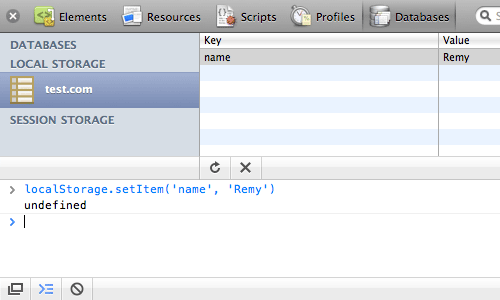 Viewing localStorage
As far as I know only Safari has this view on stored data natively in the browser. There may be a Firefox plugin (but I’ve not found it yet!) and IE… well that’s just IE.
Even though we’ve used setItem and getItem, there’s also a few other ways you can set and access the data.
In the example below, we’re accessing the stored value directly using an expando and equally, you can also set values this way:
localStorage.name = "Remy";
alert( localStorage.name ); // shows "Remy"
The Web Storage API also has a key method, which is zero based, and returns the key in which data has been stored. This should also be in the same order that you set the keys, for example:
alert( localStorage.getItem(localStorage.key(0)) );
// shows "Remy"
I mention the key() method because it’s not an unlikely name for a stored value. This can cause serious problems though.
When selecting the names for your keys, you need to be sure you don’t take one of the method names that are already on the storage object, like key, clear, etc. As there are no warnings when you try to overwrite the methods, it means when you come to access the key() method, the call breaks as key is a string value and not a function.
You can try this yourself by creating a new stored value using localStorage.key = "foo" and you’ll see that the Safari debugger breaks because it relies on the key() method to enumerate each of the stored values.
Usage Notes
Currently all browsers only support storing strings. This also means if you store a numeric, it will get converted to a string:
localStorage.setItem('count', 31);
alert(typeof localStorage.getItem('count'));
// shows "string"
This also means you can’t store more complicated objects natively with the storage objects. To get around this, you can use Douglas Crockford’s JSON parser (though Firefox 3.5 has JSON parsing support baked in to the browser – yay!) json2.js to convert the object to a stringified JSON object:
var person = {
	name: 'Remy',
	height: 'short',
	location: 'Brighton, UK'
};
localStorage.setItem('person', JSON.stringify(person));
alert( JSON.parse(localStorage.getItem('person')).name );
// shows "Remy"
Alternatives
There are a few solutions out there that provide storage solutions that detect the Web Storage API, and if it’s not available, fall back to different technologies (for instance, using a flash object to store data). One comprehensive version of this is Dojo’s storage library. I’m personally more of a fan of libraries that plug missing functionality under the same namespace, just as Crockford’s JSON parser does (above).
For those interested it what that might look like, I’ve mocked together a simple implementation of sessionStorage. Note that it’s incomplete (because it’s missing the key method), and it could be refactored to not using the JSON stringify (but you would need to ensure that the values were properly and safely encoded):
// requires json2.js for all browsers other than Firefox 3.5
if (!window.sessionStorage && JSON) {
	window.sessionStorage = (function () {
		// window.top.name ensures top level, and supports around 2Mb
		var data = window.top.name ? JSON.parse(window.top.name) : {};
		return {
			setItem: function (key, value) {
				data[key] = value+""; // force to string
				window.top.name = JSON.stringify(data);
			},
			removeItem: function (key) {
				delete data[key];
				window.top.name = JSON.stringify(data);
			},
			getItem: function (key) {
				return data[key] || null;
			},
			clear: function () {
				data = {};
				window.top.name = '';
			}
		};
	})();
}
Now that we’ve cracked the cookie jar with our oversized Web Storage API, let’s have a look at how we take our applications offline entirely.
Offline Applications
Offline applications is (still) part of the HTML5 specification. It allows developers to build a web app and have it still function without an internet connection. The app is access via the same URL as it would be if the user were online, but the contents (or what the developer specifies) is served up to the browser from a local cache. From there it’s just an everyday stroll through open web technologies, i.e. you still have access to the Web Storage API and anything else you can do without a web connection.
For this section, I’ll refer you to a prototype demo I wrote recently of a contrived Rubik’s cube (contrived because it doesn’t work and it only works in Safari because I’m using 3D transforms).
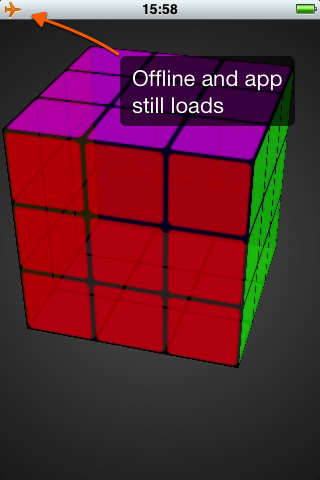 Offline Rubik’s cube
Support
Support for offline applications is still fairly limited, but the possibilities of offline applications is pretty exciting, particularly as we’re seeing mobile support and support in applications such as Fluid (and I would expect other render engine wrapping apps).
Support currently, is as follows:
- Latest: Safari (desktop & mobile/iPhone)
- Sort of: Firefox‡
- Not supported: Internet Explorer, Opera, Google Chrome
‡ Firefox 3.5 was released to include offline support, but in fact has bugs where it doesn’t work properly (certainly on the Mac), Minefield (Firefox beta) has resolved the bug.
Usage
The status of the application’s cache can be tested from the window.applicationCache object. However, we’ll first look at how to enable your app for offline access.
You need to create a manifest file, which will tell the browser what to cache, and then we point our web page to that cache:
<!DOCTYPE html>
<html manifest="remy.manifest">
<!-- continues ... -->
For the manifest to be properly read by the browser, your server needs to serve the .manifest files as text/manifest by adding the following to your mime.types:
text/cache-manifest manifestNext we need to populate our manifest file so the browser can read it:
CACHE MANIFEST
/demo/rubiks/index.html
/demo/rubiks/style.css
/demo/rubiks/jquery.min.js
/demo/rubiks/rubiks.js
# version 15
The first line of the manifest must read CACHE MANIFEST. Then subsequent lines tell the browser what to cache.
The HTML5 spec recommends that you include the calling web page (in my case index.html), but it’s not required. If I didn’t include index.html, the browser would cache it as part of the offline resources.
These resources are implicitly under the CACHE namespace (which you can specify any number of times if you want to).
In addition, there are two further namespaces: NETWORK and FALLBACK.
NETWORK is a whitelist namespace that tells the browser not to cache this resource and always try to request it through the network.
FALLBACK tells the browser that whilst in offline mode, if the resource isn’t available, it should return the fallback resource.
Finally, in my example I’ve included a comment with a version number. This is because once you include a manifest, the only way you can tell the browser to reload the resources is if the manifest contents changes. So I’ve included a version number in the manifest which I can change forcing the browser to reload all of the assets.
How it works
If you’re building an app that makes use of the offline cache, I would strongly recommend that you add the manifest last. The browser implementations are very new, so can sometimes get a bit tricky to debug since once the resources are cached, they really stick in the browser.
These are the steps that happen during a request for an app with a manifest:
- Browser: sends request for your app.html
- Server: serves all associated resources with app.html – as normal
- Browser: notices that app.html has a manifest, it re-request the assets in the manifest
- Server: serves the requested manifest assets (again)
- Browser: window.applicationCache has a status of
UPDATEREADY - Browser: reloads
- Browser: only request manifest file (which doesn’t show on the net requests panel)
- Server: responds with 304 Not Modified on the manifest file
- Browser: serves all the cached resources locally
What might also add confusion to this process, is that the way the browsers work (currently) is if there is a cache already in place, it will use this first over updated resources. So if your manifest has changed, the browser will have already loaded the offline cache, so the user will only see the updated on the next reload.
This may seem a bit convoluted, but you can also trigger some of this manually through the applicationCache methods which can ease some of this pain.
If you bind to the online event you can manually try to update the offline cache. If the cache has then updated, swap the updated resources in to the cache and the next time the app loads it will be up to date. You could also prompt your user to reload the app (which is just a refresh) if there’s an update available.
For example (though this is just pseudo code):
addEvent(applicationCache, 'updateready', function () {
	applicationCache.swapCache();
	tellUserToRefresh();
});
addEvent(window, 'online', function () {
	applicationCache.update();
});
Breaking out of the Browser
So that’s two different technologies that you can use to break out of the traditional browser/web page model and get your apps working in a more application-ny way.
There’s loads more in the HTML5 and non-HTML5 APIs to play with, so take your Christmas break to check them out!
About the author
Remy Sharp is the founder and curator of Full Frontal, the UK based JavaScript conference. He also ran jQuery for Designers, co-authored Introducing HTML5 (adding all the JavaScripty bits) and likes to grumble on Twitter.
Whilst he’s not writing articles or running and speaking at conferences, he runs his own development and training company in Brighton called Left Logic. And he built these too: Confwall, jsbin.com, html5demos.com, remote-tilt.com, responsivepx.com, nodemon, inliner, mit-license.org, snapbird.org, 5 minute fork and jsconsole.com!
Brought to you by

Related articles
-
Designing Your Site Like It’s 1998
Andy Clarke tells a tale as old as time, a tale of tables, framesets, fixed widths and spacer GIFs (ask your parents). Harking back to the methods that were appropriate to used to build cutting-edge websites twenty years ago, not only can we see how far we’ve come but can be excited for what lies ahead.
-
Feeding the Audio Graph
Ben Foxall dives deep into the Web Audio API to serve up such well known Christmas hits as I’m Dreaming Of A White Noise Generator, and All I Want For Christmas Is 440Hz. Get ready to dance around your browser this season, because it certainly won’t be a silent night.
-
HTML5 Video Bumpers
Drew McLellan invites you to pull up to the 2012 24 ways bumper, baby, with an neat JavaScript solution to an HTML5
<video>branding problem. And that was “24 ways bumper” not “Christmas jumper”. He has enough of those already. -
Speed Up Your Site with Delayed Content
Paul Hammond injects some pace into page rendering with a nifty idea to allow the most important content to take precedence over your site’s more decorative baubles. What’s Christmas without the anticipation?
-
Real Animation Using JavaScript, CSS3, and HTML5 Video
Dan Mall breathes life into web standards-based animation. By striving for more than just mechanical movement, we can create more believable animated effects to enhance our users’ experience.
-
“Probably, Maybe, No”: The State of HTML5 Audio
Scott Schiller sounds out the possibilities of HTML5 audio, listening carefully to arguments about competing formats and the quirks in current implementations. When will we hear the sleigh bells in the snow on your website?