Jump to content

Year

Day

24 ways to impress your friends

Microsoft recently announced that Internet Explorer 8 will be released in the first half of 2009. Compared to the standards support of other major browsers, IE8 will not be especially great, but it will finally catch up with the state of the art in one specific area: support for CSS tables. This milestone has the potential to trigger an important change in the way you approach web design.

To show you just how big a difference CSS tables can make, think about how you might code a fluid, three-column layout from scratch. Just to make your life more difficult, give it one fixed-width column, with a background colour that differs from the rest of the page. Ready? Go!

Okay, since you’re the sort of discerning web designer who reads 24ways, I’m going to assume you at least considered doing this without using HTML tables for the layout. If you’re especially hardcore, I imagine you began thinking of CSS floats, negative margins, and faux columns. If you did, colour me impressed!

Now admit it: you probably also gave an inward sigh about the time it would take to figure out the math on the negative margin overlaps, check for dropped floats in Internet Explorer and generally wrestle each of the major browsers into giving you what you want. If after all that you simply gave up and used HTML tables, I can’t say I blame you.

There are plenty of professional web designers out there who still choose to use HTML tables as their main layout tool. Sure, they may know that users with screen readers get confused by inappropriate use of tables, but they have a job to do, and they want tools that will make that job easy, not difficult.

Now let me show you how to do it with CSS tables. First, we have a div element for each of our columns, and we wrap them all in another two divs:

<div class="container">
	<div>
		<div id="menu">
		⋮
		</div>
		<div id="content">
		⋮
		</div>
		<div id="sidebar">
		⋮
		</div>
	</div>
</div>

Don’t sweat the “div clutter” in this code. Unlike tables, divs have no semantic meaning, and can therefore be used liberally (within reason) to provide hooks for the styles you want to apply to your page.

Using CSS, we can set the outer div to display as a table with collapsed borders (i.e. adjacent cells share a border) and a fixed layout (i.e. cell widths unaffected by their contents):

.container {
	display: table;
	border-collapse: collapse;
	table-layout: fixed;
}

With another two rules, we set the middle div to display as a table row, and each of the inner divs to display as table cells:

.container > div {
	display: table-row;
}
.container > div > div {
	display: table-cell;
}

Finally, we can set the widths of the cells (and of the table itself) directly:

.container {
	width: 100%;
}
#menu {
	width: 200px;
}
#content {
	width: auto;
}
#sidebar {
	width: 25%;
}

And, just like that, we have a rock solid three-column layout, ready to be styled to your own taste, like in this example:
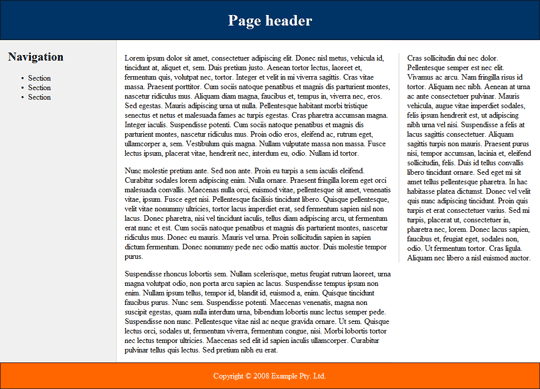
Screenshot showing a three column layout with header and footer.

This example will render perfectly in reasonably up-to-date versions of Firefox, Safari and Opera, as well as the current beta release of Internet Explorer 8.

CSS tables aren’t only useful for multi-column page layout; they can come in handy in most any situation that calls for elements to be displayed side-by-side on the page. Consider this simple login form layout:
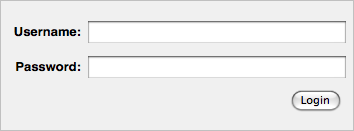
Screenshot showing a common login form with username and password fields

The incantation required to achieve this layout using CSS floats may be old hat to you by now, but try to teach it to a beginner, and watch his eyes widen in horror at the hoops you have to jump through (not to mention the assumptions you have to build into your design about the length of the form labels).

Here’s how to do it with CSS tables:

<form action="/login" method="post">
	<div>
		<div>
			<label for="username">Username:</label>
			<span class="input"><input type="text" name="username" id="username"/></span>
		</div>
		<div>
			<label for="userpass">Password:</label>
			<span class="input"><input type="password" name="userpass" id="userpass"/></span>
		</div>
		<div class="submit">
			<label for="login"></label>
			<span class="input"><input type="submit" name="login" id="login" value="Login"/></span>
		</div>
	</div>
</form>

This time, we’re using a mixture of divs and spans as semantically transparent styling hooks. Let’s look at the CSS code.

First, we set up the outer div to display as a table, the inner divs to display as table rows, and the labels and spans as table cells (with right-aligned text):

form > div {
	display: table;
}
form > div > div {
	display: table-row;
}
form label,
form span {
	display: table-cell;
	text-align: right;
}

We want the first column of the table to be wide enough to accommodate our labels, but no wider. With CSS float techniques, we had to guess at what that width was likely to be, and adjust it whenever we changed our form labels. With CSS tables, we can simply set the width of the first column to something very small (1em), and then use the white-space property to force the column to the required width:

form label {
	white-space: nowrap;
	width: 1em;
}

To polish off the layout, we’ll make our text and password fields occupy the full width of the table cells that contain them:

input[type=text],
input[type=password] {
	width: 100%;
}

The rest is margins, padding and borders to get the desired look. Check out the finished example.

As the first tool you reach for when approaching any layout task, CSS tables make a lot more sense to your average designer than the cryptic incantations called for by CSS floats. When IE8 is released and all major browsers support CSS tables, we can begin to gradually deploy CSS table-based layouts on sites that are more and more mainstream.

In our new book, Everything You Know About CSS Is Wrong!, Rachel Andrew and I explore in much greater detail how CSS tables work as a page layout tool in the real world. CSS tables have their quirks just like floats do, but they don’t tend to affect common layout tasks, and the workarounds tend to be less fiddly too. Check it out, and get ready for the next big step forward in web design with CSS.

Like what you read?

Comments

Comments are ordered by helpfulness, as indicated by you. Help us pick out the gems and discourage asshattery by voting on notable comments.

Got something to add? You can leave a comment below.

  • Johns Beharry http://johnsbeharry.com

    I’ve tried out the css tables before and obviously because of IEs… reputation that was instantaneously relinquished as a method.

    I’d love to check out your book though looks like an interesting read… I’m wrong about css… dam 12 days till Christmas wow

    Vote Helpful or Unhelpful

  • Hein Haraldson Berg http://haraldsonberg.net/

    As this technique is great — simple and powerful — I have to say I won’t be needing to know anything about it for many years to come yet.

    IE6 and IE7 will still hang around for a long time, unfortunately (as you also, in a way, state near the bottom of this article). I envy those who can take this and similar techniques into practice right away. The project would have to be special, to say the least.

    Some of the markup structure could probably work for older browsers with different styles, but this wouldn’t be more effective than just writing all the float work-arounds in the first place.

    I don’t know, I’m tired of ‘dreamy’ articles, tired of waiting for the browsers to catch up. Tired of having great techniques available that I can’t really use.

    Vote Helpful or Unhelpful

  • Erik Vorhes http://textivism.com/

    I’m curious if the Dean Edwards’ JavaScript files (which Jeremy Keith mentioned a few days ago) can help with IE6&7’s handling of CSS tables. (I don’t remember anything from the documentation but could be mistaken. Please let me be mistaken!)

    Vote Helpful or Unhelpful

  • Arjan http://arjaneising.nl

    I already find this technique useful sometimes when making advanced menus, like one that is centered and where the menu items are variable in width.

    By the way, you can also style the <code>form</code> element with <code>display:table</code>, since it also is a container. Saves you a <code>div</code> /purist :)

    The preview doesn’t allow me to use the <code>code</code> element, while the Textile preview does.

    Vote Helpful or Unhelpful

  • Matthias Edler-Golla http://wachenfeld-golla.de

    I read the book “everything you know about css is wrong” and I have to tell you that the title is definitely misleading and a huge exaggeration!

    The book basically is about css tables (like this artikle) and shows interesting examples of how to use this.

    The rest of css stays untouched, because everything we learnt about css is still right!

    Vote Helpful or Unhelpful

  • Bradley Wright http://intranation.com/

    I’m glad someone finally mentioned that excess DIVs isn’t always a bad thing (within reason, agreed). Semantic purity does not extend to DIVs, for the reasons given. Good show.

    Vote Helpful or Unhelpful

  • cssbit http://cssbit.com

    it’s an easy way to create a page with css & xhtml
    IE6 don’t support that but its not a big problem

    thanks your for this useful article

    Vote Helpful or Unhelpful

  • Chris Beaven http://www.saobart.com

    I believe its up to Us, the designers and developers, to move forward. Yeah, IE is a worthless pile of garbage and everyone is lazy enough to let that garbage keep the community behind. But think about this, I work on a web application built close to 2001 and its nothing but tables. I wish the programmer had the fore site to use CSS for all its worth. Now the project is so far along and we have so many clients using the current version that its nearly impossible to change its structure to even include a ‘ul’.

    Every personal project I work on now will implement current standards in css and html, and I will just plug-in legacy support for crappy browsers. Because when the time comes to stop supporting IE6 and 7, it will be much easier if all I have to do is delete a file.

    I may even work on restructuring WordPress to use nothing but CSS tables.

    Stop whining and break out your IE conditional comments, because not moving forward is just like supporting IE and old standards.

    Vote Helpful or Unhelpful

  • Steve Rose http://simplyFULL.com

    The form you’ve shown would be usable right now. With IE7 the labels just wind up above the input fields, which seems okay. However, the whole page layout doesn’t degrade very well in IE7.

    Vote Helpful or Unhelpful

  • Ray Drainville http://blog.ardes.com/

    Using CSS tables for forms is an eye-opener—it’ll certainly make forms more bullet-proof in terms of design; and it’ll be a hell of a lot easier to define the styles than it is currently.

    @chris: Whilst I sympathise with your frustrations with IE6 & 7 (oh, God, do I), abandoning them isn’t a realistic option for most of us; and it won’t be for some time to come. One of my clients has around a 90% user base of IE6 users. We can’t just treat them as second-class citizens: they pay the bills, :)

    You’re right, those conditional comments will be used for quite some time; and in fact they’ll be doing more heavy lifting, now that more of the layout will (of necessity) be shunted off to them.

    Vote Helpful or Unhelpful

  • Jonny Haynes http://www.jonnyhaynes.com

    I’m buying the book right away! I’ve never tried using CSS tables but was intrigued after reading Andy Clarke’s article on For A Beautiful Web.

    Nice work! Keep it up!

    Vote Helpful or Unhelpful

  • Matt Wilcox http://mattwilcox.net

    CSS Tables for layout are a bad idea. They offer nothing but a semantically prettier table. With all the remaining problems of a table.

    http://mattwilcox.net/archive/entry/id/1030/

    Vote Helpful or Unhelpful

  • Drew McLellan http://allinthehead.com/

    CSS Tables for layout are a bad idea. They offer nothing but a semantically prettier table. With all the remaining problems of a table.

    Matt – did you even read the article? Of course, it’s possible to fall into a trap of using CSS tables badly – just as it’s possible to misuse any tool.

    But look at Kevin’s log in form example. There’s no additional markup (in fact, a lot less markup than many people would currently add to provide CSS hooks). There’s nothing at all that introduces the problems associated with HTML tables for layout.

    Vote Helpful or Unhelpful

  • Jonny Haynes http://www.jonnyhaynes.com

    Can you use colspan or rowspan to turn it into a proper table? Or is it just for columns, not actually building a ‘proper’ table with a header and a footer?

    Vote Helpful or Unhelpful

  • Garann

    But look at Kevin’s log in form example. There’s no additional markup (in fact, a lot less markup than many people would currently add to provide CSS hooks).

    Maybe I’m missing something, but looks to me like there are two extra elements for each label/input vs. what you’d need if you weren’t using CSS tables. The span seems wholly unnecessary, and the div wrapping each set should only be necessary for IE6… where CSS tables fail anyway, right?

    Vote Helpful or Unhelpful

  • David http://webmodia.com

    Just echoing some earlier posted sentiments but worth repeating: just b/c IE8 is going to be released sometime in 2009 DOES NOT mean it is going to be so quickly adopted by all the IE6/7 users out there (who account for somewhere around 70% of typical market share still, on the conservative scale).

    I’m not denying the fact that one could fork their code to supply CSS tables for all “modern” browsers and deliver “fallback” float/positioning layout styles via conditional comments to support IE6/7. But what’s the point of all that extra work? From a business/production standpoint, that’s just not practical.

    Whereas, I’ve always been able to get even the most challenging layouts to work cross-browser with floats etc. Yes IE needs to be served a few fixes usually… but certainly it’s less work to make minor tweaks for one technique as opposed to fully coding two entirely different CSS layout models.

    You could argue for graceful degradation and let IE6/7 basically choke on the CSS tables and merely get a simplified version of the design. But try telling a paying client their site won’t display as designed for such a large share of the market. Also not a practical option in most real world situations.

    So yes, the idea of CSS tables is indeed interesting. It is definitely worth being familiar with for future use, and of course good to have in your toolbox for use whenever/wherever appropriate right now. 100% agreed.

    But to call CSS tables the “first tool you reach for” as a production layout technique? That’s an overstatement. Just my opinion, though.

    Speaking of overstatements, and comments above regarding the book Mr. Yank is hawking… yes, I agree the title Everything You Know About CSS Is Wrong! is misleading. The entire book is devoted to CSS tables as a layout technique, and we all know CSS covers a whole lot more than just layout.

    I am curious to thumb through a copy, however, as I’d really like to see Kevin’s suggestions for addressing the source order limitations with CSS tables.

    From an SEO and accessibility standpoint, layout via CSS floats provides flexibility in ensuring the most important content can come first in the source order regardless of the design requirements.

    Whereas, CSS tables for layout requires the content to be in the same order in the markup as it needs to be displayed on screen, which is of course mixing content with presentation. I should probably do some tests first to confirm, but that’s my understanding. Please correct me if I’m wrong.

    Vote Helpful or Unhelpful

  • BoltClock http://blog.NOVALISTIC.com

    That’s really impressive! I’ll have to admit: I am starting to develop faith in Microsoft which I’ve never had in my young life.

    Me, I’ve thrown IE6 out the window (while still supporting IE7). But objectively speaking, the rest are right: IE6 and 7 will still be around for the years to come (two, three?), and in order to move forward we’ll probably have to draw a line precise to the very micron. I concur especially with David regarding the adoption of IE8 and the practicality of CSS tables as it is now. He’s certainly hit the nail on the head.

    Vote Helpful or Unhelpful

  • Tim Hessel http://www.litso.com

    I’m really glad to see some critics are amongst the last few commentors. The only thing CSS tables improves is the possibility to use equal-height columns in flexible layouts, but I see as much semantic clutter (among which I count divs and spans, yes) in this method as in other methods like the faux columns or the ‘holy grail’ .

    Apart from that I don’t really see the difference between using css tables and regular tables. In short, I agree with Matt and David.

    Vote Helpful or Unhelpful

  • Jon Zuck http://wildwebweaving.com

    David, I think you’re confusing CSS “tables” with HTML tables, which do lock in presentation and source order. CSS “tables” are simply settings in the CSS. If you want to change it so the first div moves to the right, just change it from display: table-cell; to float: right; and Voila! You might want to reread the article.

    Tim, CSS3 also allows for anonymous elements… It’s possible to get DIVs to act as “table-cells” in a row, without surrounding DIVs playing the roles of “table” and “tr” This short article just scratches the surface of the possibilities

    Vote Helpful or Unhelpful

  • Christopher Olberding http://www.stationfour.com

    Echoing @David above. IE8 just coming out isn’t going to change anything. While it’s interesting, I don’t see any reason to put the entire topic on the “Become more familiar with the topic when it matters” shelf and moving on. There’s is just way too much to learn to spend my time (now) on things like this.

    Additionally, in the example given, simply using conditional stylesheets for IE6 & 7 isn’t a simple or trvial matter. It seems that in most cases using CSS tables would significantly increase production time without a super big benefit.

    Vote Helpful or Unhelpful

  • Chris W. http://www.chris-wallace.com

    Actually, you don’t even need to add additional markup or CSS for table“wrapper” elements (display:table). You can simply create row wrappers (display:table-row) with “cells” inside and it will display the proper layout. Just removes some complexity, which is really the big problem with this approach. However, I can still hardly condone it as a standards-based approach.

    Vote Helpful or Unhelpful

  • Davod http://www.webmodia.com

    @Jon Zuck – indeed, I understand the difference between CSS tables and HTML/markup tables. My point (one of them ;) was that the CSS tables layout model binds you to a particular markup source order.

    So yes, if you want the first div to move to the right (or elsewhere just other than its natural position in the flow per source order) you would have to change the CSS to not use CSS tables and instead use another positioning model such as floats. Which is exactly the example / solution you gave – and which of course makes my point: CSS tables limits the display position of content on screen to the source order. You may want to reread my comment :)

    Vote Helpful or Unhelpful

  • clearance london http://www.wecleareverything.co.uk

    Many interesting informations!!! Really great site :) CSS3 also allows for anonymous elements… It’s possible to get DIVs to act as “table-cells” in a row, without surrounding DIVs playing the roles of “table” and “tr” This short article just scratches the surface of the possibilities.
    Thx

    Vote Helpful or Unhelpful

  • simple websites http://www.mysimpleweb.co.uk

    David, I think you’re confusing CSS “tables” with HTML tables, which do lock in presentation and source order.
    Very interesting :) thx

    Vote Helpful or Unhelpful

  • Artur Bodera

    It looks much like trying to force/bend CSS where it should not go. The purpose of <table> is for “tabular data” and is being referred to as such in all modern specifications (i.e. html 5).

    Changing display css attributes to make div look like a cell? It’s most funny when the css-based markup has a very similar structure to an ordinary <table> but with <td> replaced with divs.

    Common people. In terms of dom structure and css, thinking out-of-the-box and as a proof of concept, you should be able to create the same effect as a <table><tr><td> with <strong><cite><blockquote> – it’s just a matter of changing the display attributes to “table-*” and you’re done. But what for ?

    I’d gladly go past css 2 and dump ie6, but I really miss the times, when I’ve prepared all layouts in tables. I had my tricks to make them look the same in all browsers and IE-modes. Why I miss that? Because it took me half the time to code it (even though the html tables were nested as hell) and it ALWAYS worked the way I wanted without much trouble.

    Now we have a beautiful, short, semantic markup (invisible feature, only for devs) and broken-with-each-version-of-ie-and-firefox layouts that get awful (visitors, visible feature).

    It kinda reminds me of the difference between a mac and a pc – with a pc you get compatibility with anything, option to choose and pick from many vendors and technologies. With a mac, you have one platform, one vendor and one seamless technology. With the all-compatible pc came drivers, conflicts, hangs and head scratching. With the mac comes a peaceful mind and expectable results even though mac os is based on unix, and is more ambiguous if you want to hack it.

    Vote Helpful or Unhelpful

  • bmwfan http://xbmw.blogspot.com/

    Thanks for article. Keep working, please.

    p.s. found 2 useful things (new book for reading “about css is wrong” and new interesting blog CSSBIT)

    Vote Helpful or Unhelpful

Impress us

Be friendly / use Textile

About the author

Kevin Yank

Kevin Yank is the Technical Director of SitePoint, a respected publisher for web professionals. An accomplished speaker and writer, he has written books about PHP, JavaScript, and CSS, and a weekly newsletter with nearly 400,000 subscribers. He lives in Melbourne.

More information

Brought to you by:

Perch - a really little cms

The easiest way to publish fast, flexible HTML5 websites your clients will love.